Guides
AI Headshot Prompts: 8 Professional Portrait Briefs
Eight AI headshot prompts for professional portraits, with a reference-edit example and practical checks for facial likeness, natural skin, clothing, and crops.
A good AI headshot prompt starts with a recent reference photo and states what must remain recognizable. Then specify the outfit, background, lighting, expression, and crop. Ask for a professional photograph of you, rather than an idealized face with a few matching attributes.
Below are eight copyable headshot prompts, a generated source-to-edit example, and a checklist for rejecting images that look polished but do not look like you. The prompts are adaptable briefs, not a promise of exact identity preservation across every image model.
How to make a good headshot with AI?
Use a clear, current photo, keep the identity instructions explicit, and change the presentation one step at a time. Your first goal is recognition; wardrobe and background come after it.
LinkedIn's profile guidance recommends choosing a photo that reflects how you look today and how you normally dress professionally. Treat that as the acceptance standard when reviewing an AI edit.
- Pick an honest reference. Use a recent image with a clearly visible face, ordinary expression, and lighting that lets you see your features.
- Choose a recognizable presentation. Specify clothing you would actually wear in the context where the image will appear.
- Describe the edit. Name the background and lighting changes separately from the features that should stay.
- Compare side by side. Check the face before judging the background.
- Preview the destination crop. A headshot that looks good full size can feel cramped when displayed as a small avatar.
In Dream Pixel Forge, the LinkedIn headshot tool supports a reference image, attire choices, and backdrop choices. A text-only description can create a fictional person; attach your own reference when your actual likeness is the point.
The reusable headshot prompt
Separate identity, presentation, and exclusions into short, concrete instructions. Replace the bracketed choices below, then remove any directions that do not fit the job.
Use the attached recent photo as the identity reference. Preserve my facial proportions, age, skin tone, eye shape, nose, hairline, hair texture, and distinctive features. Keep natural skin texture and my recognizable appearance.
Create a professional head-and-shoulders portrait. Outfit: [navy blazer and plain white shirt]. Background: [light gray seamless studio]. Lighting: [soft window light, gentle fill, realistic skin color]. Expression: [relaxed small smile, looking at camera]. Framing: [centered square crop with room above the hair and both shoulders visible]. Do not reshape my face, erase distinctive marks, add accessories, or create text.
“Professional” alone leaves too much open. A blazer, simple background, direct gaze, and soft light are visible instructions. “Successful,” “high status,” and “perfect” do not tell the model which pixels you need and can pull the result away from a useful likeness.
Try it now
Free to try, no account needed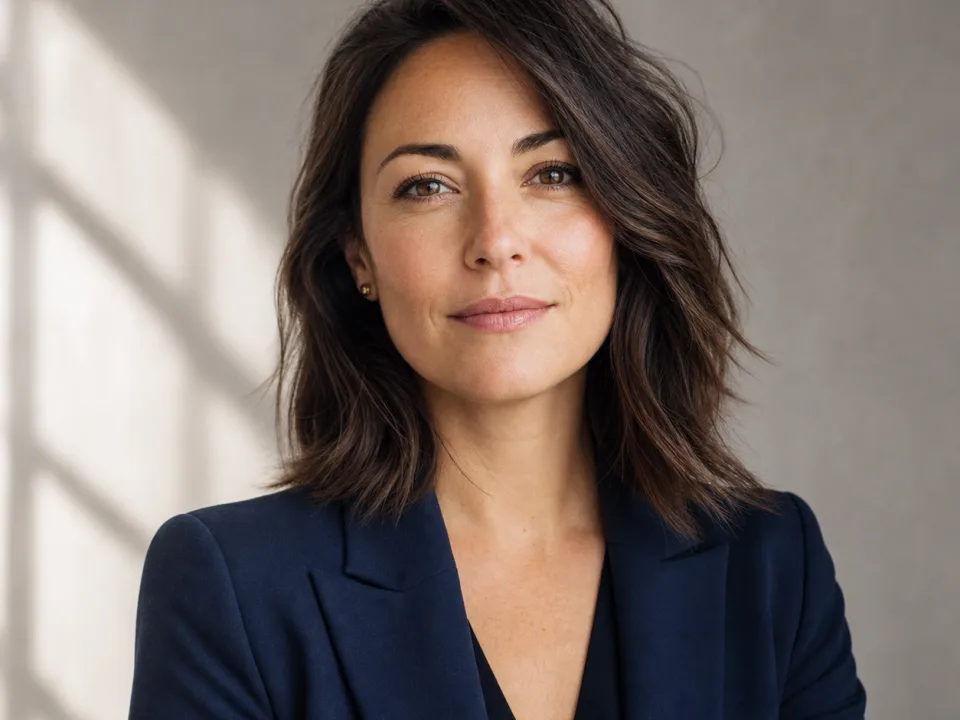 Example output
Your generated image will replace this example.
Eight AI headshot prompts for different settings
Use the same identity paragraph at the beginning of each prompt, then add one of the directions below. Keep the reference photo fixed while comparing these styles.
1. A neutral LinkedIn headshot
Choose a quiet gray background and familiar business clothing for a broadly usable profile photo.
Use the attached recent photo as the identity reference. Preserve my facial proportions, age, skin tone, eye shape, nose, hairline, hair texture, and distinctive features. Keep natural skin texture and my recognizable appearance. Create a centered square head-and-shoulders portrait. Keep my usual hairstyle and a relaxed small smile. Navy blazer over a plain ivory shirt. Light gray studio background, soft diffused light, gentle shadows, sharp eyes. Comfortable headroom and both shoulders visible. No logos or text.Check whether the smile and eye shape still resemble the reference. A different expression can make the result feel unlike you even when the hair and outfit match.
2. A warm office portrait
Use an office setting when you want context without a busy scene competing with your face.
Use the attached recent photo as the identity reference. Preserve my facial proportions, age, skin tone, eye shape, nose, hairline, hair texture, and distinctive features. Keep natural skin texture and my recognizable appearance. Create a head-and-shoulders professional portrait in a softly blurred warm office interior. Keep my existing outfit and expression. Center my face with generous room around my hair. Natural window light, neutral skin tones, realistic hair detail. The background should be indistinct, with no readable signage or invented company logos.Do not describe a named employer's office unless that association is appropriate. A generic environment can provide warmth without implying a particular workplace.
3. A creative professional
Use a clean solid-color outfit and a restrained studio setting when a formal suit would misrepresent your everyday work.
Use the attached recent photo as the identity reference. Preserve my facial proportions, age, skin tone, eye shape, nose, hairline, hair texture, and distinctive features. Keep natural skin texture and my recognizable appearance. Create a professional portrait of me wearing a plain dark green crew-neck top. Soft warm off-white studio wall, natural side light, relaxed confident expression. Head and upper shoulders, slight body angle with eyes toward camera. Keep my actual facial structure and skin texture. No props, text, or accessories that are not in the reference.Change the color to something you wear. The aim is a coherent presentation, not dressing every creative worker in the same invented uniform.
4. An approachable outdoor portrait
Use a soft background and gentle daylight when your profile benefits from a less formal atmosphere.
Use the attached recent photo as the identity reference. Preserve my facial proportions, age, skin tone, eye shape, nose, hairline, hair texture, and distinctive features. Keep natural skin texture and my recognizable appearance. Create a head-and-shoulders portrait outdoors in soft open shade. Background greenery is gently blurred and secondary. Keep my present clothing, hairstyle, and natural expression. Even light across the face with realistic skin color. No direct sun patches across the eyes, no dramatic color grading, no added text.Inspect the hairline against the greenery. Fine hair and blurred foliage can blend together in ways that are easy to miss at thumbnail size.
5. A company directory portrait
Use a simple repeatable specification when several people need matching framing.
Use the attached recent photo as the identity reference. Preserve my facial proportions, age, skin tone, eye shape, nose, hairline, hair texture, and distinctive features. Keep natural skin texture and my recognizable appearance. Create a square company-directory headshot. Head and shoulders centered, camera at eye level, consistent comfortable space above the head. Plain light gray background, soft frontal light with subtle side shadow. Keep my existing professional clothing and natural expression. Realistic skin texture, no facial reshaping, no text or logos.Use each person's own reference and compare the framing across the set. Matching backgrounds does not justify making faces, skin tones, or ages more alike.
6. A speaker biography photo
Leave a little more room around the subject when an event organizer may need multiple crops.
Use the attached recent photo as the identity reference. Preserve my facial proportions, age, skin tone, eye shape, nose, hairline, hair texture, and distinctive features. Keep natural skin texture and my recognizable appearance. Create a professional speaker biography portrait from the chest upward, with extra space above the head and at both sides. Keep my current outfit. Neutral textured studio background, soft balanced lighting, calm friendly expression. Make the face the focus while keeping shoulders fully inside the image. No podium, microphone, badges, or written text.A clean portrait is easier to reuse than a fabricated conference scene. Let the event designer add names and titles in the actual layout.
7. A glasses-preserving portrait
Name the glasses explicitly when their shape and position are part of how people recognize you.
Use the attached recent photo as the identity reference. Preserve my facial proportions, age, skin tone, eye shape, nose, hairline, hair texture, and distinctive features. Keep natural skin texture and my recognizable appearance. Keep the exact glasses frame shape, color, size, and position from my reference. Create a natural professional headshot on a soft gray background. Reduce distracting glare while preserving believable lens reflections. My eyes remain clearly visible behind the lenses. Keep my outfit, hairstyle, expression, and face unchanged.Check both lenses, bridge, and arms. Reject a result that removes the lenses entirely or changes the frame to a different style.
8. Change only the background
Choose the smallest edit when the original face, clothing, and lighting already work.
Edit only the background of the attached headshot to a softly lit neutral gray studio backdrop. Preserve the person, facial features, expression, skin texture, hair, clothing, accessories, crop, and lighting. Keep natural edge detail around the hair and shoulders. Do not retouch or reshape the face. No text.This is a useful first edit because the acceptance criteria are narrow. If the face changes anyway, return to the original rather than building more edits on the altered likeness.
A generated example: gray studio to warm office
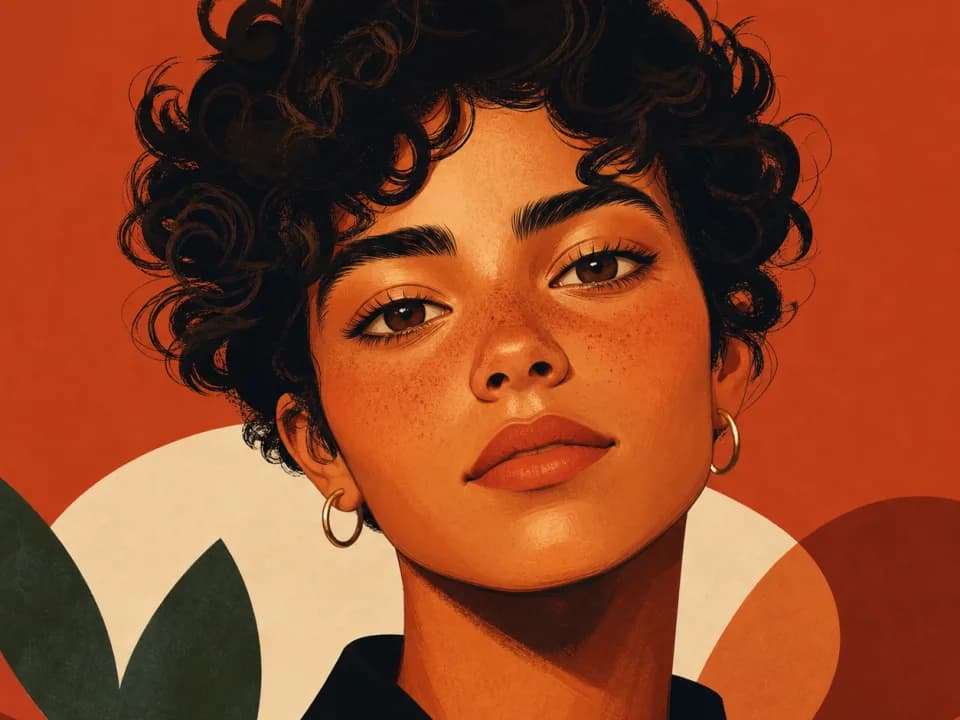
We used the fictional portrait at the top of this article as the source and asked for a square office edit. Both images were generated with GPT Image 2.5 through the built-in image tool. This demonstrates one edit of a synthetic identity, not measured fidelity on a real person.
Edit this supplied portrait into a centered square professional headshot. Preserve this fictional woman's identity, facial proportions, age, skin tone, eyes, hairline, hair texture, silver earrings, smile and navy blazer with ivory shirt. Change only framing to centered head-and-shoulders square with comfortable headroom and background to softly blurred warm office interior. Keep natural skin texture and original soft lighting, no text or logos.The result follows the requested square composition and office setting. The hair arrangement and fine facial details are not pixel-identical to the source. That difference is the reason to inspect a real headshot closely instead of accepting an identity instruction as proof of preservation.
Fix common headshot problems with smaller edits
Identify the specific defect and ask for one correction. Rewriting the entire portrait brief makes it harder to understand which change helped.
| Problem | Next instruction | Acceptance check |
|---|---|---|
| Over-smoothed skin | Restore natural skin texture without changing facial structure | Pores and normal texture look plausible |
| Unfamiliar smile | Use the original reference expression | Mouth shape and teeth match your appearance |
| Wrong age | Preserve age and visible facial lines from the reference | The image looks current |
| Busy background | Change only the background to a simple neutral wall | Face remains the strongest visual element |
| Tight crop | Add room around the head and shoulders without changing the face | Hair and chin survive the destination crop |
If repeated edits drift, return to the original reference. Keep the version you accepted as a separate file so a later experiment does not become the accidental new source.
Review the face before exporting
Compare facial proportions, age, skin tone, hairline, distinctive marks, glasses, and expression at full size. Then view the image at the small size where it will actually appear.
Ask someone who knows you whether the image is immediately recognizable. Do not use a result that requires explaining away a different nose, altered jaw, or unfamiliar smile. A less dramatic edit that looks like you is more useful than an impressive portrait of someone else.
Keep the full-resolution accepted file and make separate crops for each destination. For additional portrait work, see our GPT Image 2.5 prompting guide. To create related profile graphics after your portrait is approved, use the social media post generator.
What is the best prompt for creating a professional headshot using ChatGPT?
Start with your attached reference and this brief: “Create a professional head-and-shoulders portrait of me. Preserve my facial features, age, skin tone, hairline, and recognizable appearance. Use soft natural light and a simple neutral background. Keep realistic skin texture and my natural expression.” Add your actual outfit and required crop. Review the resulting likeness before using it.