Guides
AI Product Video Generator Guide: Photos to Video Ads
Turn product photos into AI video ads with six motion prompts, a three-shot plan, and checks for labels, product details, and usable footage.
To turn a product photo into an AI video ad, approve the still first, animate one simple action, then assemble the final ad in an editor. Start with a clear view of the actual product. Decide what must remain unchanged, including the package shape, label, material, and color. Give the video prompt a separate job: describe movement.
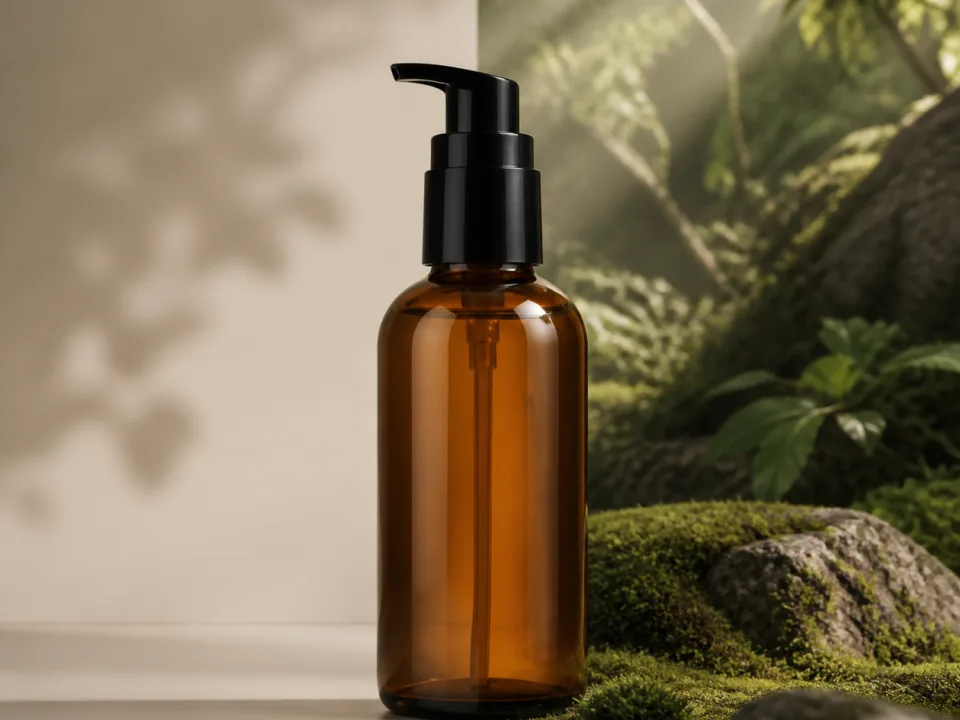
This guide gives you a practical shot plan, six copyable motion prompts, and a review process for product videos. The prompts are suggested starting points, not a tested model benchmark. We generated the editorial still above for this article; we did not generate or evaluate video clips for it.
Choose the kind of product video you need
Choose between an animated product scene, a demonstration, and a presenter-led ad before selecting an AI product video generator. They require different evidence and different inputs.
| Video | Good starting material | What to check |
|---|---|---|
| Product atmosphere | Approved package photo in a simple scene | Silhouette, label, surface reflections |
| Feature close-up | Actual detail photograph | Buttons, stitching, ports, texture |
| Product demonstration | Real footage of the feature working | Whether the action represents the real product |
| Presenter introduction | Authorized presenter reference and approved script | Identity, hands, speech, product interaction |
For a first attempt, choose atmosphere: a slow move toward a bottle, a gentle fabric movement behind shoes, or sunlight crossing a desk. If the selling point is how a mechanism works, use real demonstration footage for that part. An attractive animation alone does not establish performance.
Prepare the product photo before animating
Your opening image should already be a usable advertisement without motion. Fix wrong labels, cropped edges, reflections, and unwanted props before you send it to a video model.
Runway's image-to-video guide explains that the input image supplies the composition, subject, lighting, and style. It also warns that existing visual artifacts can become more pronounced during animation. This is why a clean source matters more than adding elaborate adjectives to the motion prompt.
- Use your actual product as the reference. Keep the original packshot available beside the working scene.
- Choose the intended framing. Leave space for your planned headline and avoid placing important details against the frame edge.
- Check the package at full size. Read the label. Count parts. Compare the cap, handle, fasteners, and contact shadow.
- Approve the scene. Decide whether the environment suggests the intended use without inventing a feature.
- Save this accepted image. Reuse it when comparing motion prompts so the source does not change between attempts.
If you need a setting for an existing packshot, use the product lifestyle scene tool. Our AI product photography guide covers the still-image stage. Review the resulting scene against the original product before proceeding.
Create a starting still using the attached product photo as the product reference. Place this exact bottle upright on a pale stone bathroom shelf. Preserve its silhouette, cap, label text, label placement, material, and color. Soft morning light from the left. Keep the whole bottle visible and leave the top quarter quiet for copy added later. No extra products or hands. Do not add text to the scene.This is an image-editing brief. Submit it to the image stage, then use a shorter movement brief for video. A direction to preserve packaging is an instruction to inspect, not a guarantee that the model will comply.
Write motion prompts around one visible action
Describe what moves, how the camera moves, and how the shot ends. Start with one main action so a failed result has an obvious next correction.
Runway recommends concentrating image-to-video prompts on motion and beginning simply. Our working structure is: camera action + subject action + environmental movement + ending. You do not need every element in every shot.
The camera slowly pushes toward the bottle. The bottle remains upright and stationary. A soft reflection moves across the glass. The shot settles on a clear front view of the label.Choose the duration and aspect ratio in the generator's actual controls. A duration written in prose is creative direction; it does not replace a supported duration setting. Avoid asking for an entire multi-scene commercial inside a single short shot.
Six product video prompts to adapt
These prompts cover six separate shots. Attach the appropriate approved starting image to each, then replace the product noun only when necessary. Treat the review notes as acceptance criteria.
1. The quiet hero reveal
Use a slow approach when the product silhouette and package are the main message.
Continuous shot. The camera slowly moves closer to the upright bottle, keeping its front label facing the viewer. The bottle stays still on the shelf. Soft daylight remains steady. End with the entire bottle still inside the frame and a clear view of the label.Review: compare the label at the beginning, middle, and end. Reject a clip that subtly changes the brand lettering or trims the cap out of frame.
2. A textile detail
Use a close-up to show material, with the movement assigned to a background element.
Locked camera on the folded linen shirt. The shirt stays still, with its weave and buttons clearly visible. A sheer curtain in the distant background moves gently in a breeze. Soft side light stays consistent. One continuous quiet shot.Review: keep attention on the real garment details. If stitching crawls or buttons change, simplify the environment and try again.
3. A subtle camera slide
Use a small lateral move when the product benefits from a sense of depth.
The camera slides slowly a short distance from left to right past the stationary ceramic mug. Keep the mug fully visible on the table. The handle retains its shape. Gentle background parallax, steady natural lighting, continuous shot, ending at a slight three-quarter view.Review: watch the handle opening and rim. Do not ask for a full orbit if you only have a reliable front view and need accurate unseen details.
4. A changing highlight
Use controlled light movement for a reflective package while keeping its position fixed.
Static camera. The perfume bottle remains completely stationary. A broad soft highlight travels slowly across the glass from left to right, revealing the edges. The label remains readable throughout. End on the original balanced lighting. One continuous studio product shot.Review: the highlight should move without the glass melting, liquid level shifting, or label becoming a reflective patch.
5. A gentle lifestyle moment
Use restrained human movement when a person establishes context without demonstrating a feature.
The woman seated behind the bottle gives a small relaxed smile while looking at it. Her hands remain resting on the table, separate from the product. The bottle stays upright and unchanged. The camera remains still. Natural breathing and a quiet studio atmosphere, one continuous shot.Review: check fingers, face, and product edges through the whole clip. The article's hero illustrates this starting composition; it is not evidence that this motion prompt has been rendered successfully.
6. A clean closing shot
Keep the final shot visually simple so an editor can add the offer and call to action.
The camera gently settles into a front-facing view of the product on its plinth. The product stays fully inside the frame. The upper third remains an uncluttered background. Motion gradually comes to a stop. Maintain even light and a readable package.Review: check that the final moment has room for your copy. Add pricing, logos, and the final call to action as editable graphics after generation.
Build a three-shot ad from accepted clips
Assemble a simple sequence: establish the product, show one useful detail, and finish with an offer. The table below is an editorial plan, not a model duration specification.
| Part | Suggested edit length | Job |
|---|---|---|
| Opening | About 3 seconds | Show the product clearly and introduce the reason to care |
| Detail | About 4 seconds | Show the relevant material or actual feature |
| Close | About 3 seconds | Give the viewer an offer and next step |
Generate clips using supported model settings, then trim to the pacing you need. Keep the text readable at the final viewing size. Watch once with sound off to check whether the product and offer still make sense. Review audio separately, especially accidental dialogue or sounds that imply a feature the product does not have.
To compare creative directions, change one element: the opening composition, the headline, or the first action. Keep the accepted product reference fixed. Naming files by product, shot, and version makes it easier to trace a winning edit back to its source.
Review more than the first frame
A usable product clip must preserve the product throughout the shot, not just at its opening. Scrub slowly and inspect transitions where the camera moves or an object crosses the product.
- Identity: the package shape, logo, text, color, and parts match the original.
- Physics: the product rests on the surface and shadows remain plausible.
- Interaction: hands do not merge into handles, lids, or straps.
- Truthfulness: the clip does not invent a working feature, included accessory, or result.
- Delivery: copy is readable, the crop is intentional, and the ending is usable.
If a shot repeatedly fails, reduce its motion or replace it with an edited still. A controlled still with a clean graphic transition can communicate the offer without asking a generative model to reconstruct hidden product geometry.
What is the best AI video generator for creating products?
The useful choice is the generator that preserves your specific product while producing the movement you need. Compare candidates using the same accepted image and shot brief. Check the whole clip before comparing generation speed or visual drama.
Our AI video models guide covers model options. Start with the AI video generator when your source still is ready. The important deliverable is an accepted shot you can actually use in the edit.