Guides
Gemini Omni Flash: What Google's Video Model Actually Does
Gemini Omni Flash generates and conversationally edits video at $0.10 per second. Verified specs, pricing, free access, and how it compares to Veo 3.1.
Gemini Omni Flash is Google's conversational video model: you describe a clip, it generates one, and then you keep changing it by talking to it instead of rewriting the prompt and rolling again. It is the first model in the Gemini Omni family, and the naming is the point. Video stopped being a separate Google product line and became a mode of Gemini.
It is also not new, which matters if you are reading a page that says it just launched. Google announced it at I/O on May 19, 2026, opened developer access on June 30, and put it in Google Vids on July 16. What landed in August was marketing: a builders showcase on August 7 and an expert roundtable on August 13, plus a separate Gemini 3.7 Flash release the same week that is a text model and has nothing to do with video. Below is what the model actually does today, checked against Google's model card and pricing page rather than the launch copy.
What is Gemini Omni Flash?
Omni Flash combines Gemini's reasoning with Google's generative media stack. Practically, that means it takes a combination of text, images, audio, and video as input and returns video with audio, and it holds enough context to understand an instruction like "keep the shot but make it dusk and lose the second car" as an edit rather than a new brief.
Google's framing on the model card is that this is "our next step towards models that can create and edit anything from any input, starting with video." Video is the first output modality, not the intended final one. Image and audio output are stated as future work.
Gemini Omni Flash pricing and specs
The gap between the announcement and the shipping model is wide enough to plan around. These are the current numbers from the Gemini API model card and pricing page.
| Property | Value |
|---|---|
| Model ID | gemini-omni-flash-preview |
| Status | Preview, not GA |
| Resolution | 720p only |
| Duration | 3 to 10 seconds |
| Frame rate | 24 FPS |
| Inputs (API) | Text, image, video up to 10s for editing |
| Context window | 1,048,576 tokens |
| Price | $17.50 per 1M video output tokens, roughly $0.10 per second at 720p |
| Free API tier | None |
Two of those deserve emphasis because third-party posts get them wrong. There is no 1080p or 4K tier: Omni Flash generates 720p, full stop, while Veo 3.1 scales to 4K. And ten seconds is a hard ceiling, so anything longer means stitching clips in an editor.
Conversational video editing is the actual new idea
Every video model can generate. The thing Omni Flash does that the others largely do not is hold a clip in context and accept successive plain-English changes to it: move the camera, change the season, swap the jacket, remove a character. Google's own evaluation put 504 side-by-side examples in front of human raters and scored the result as Elo.
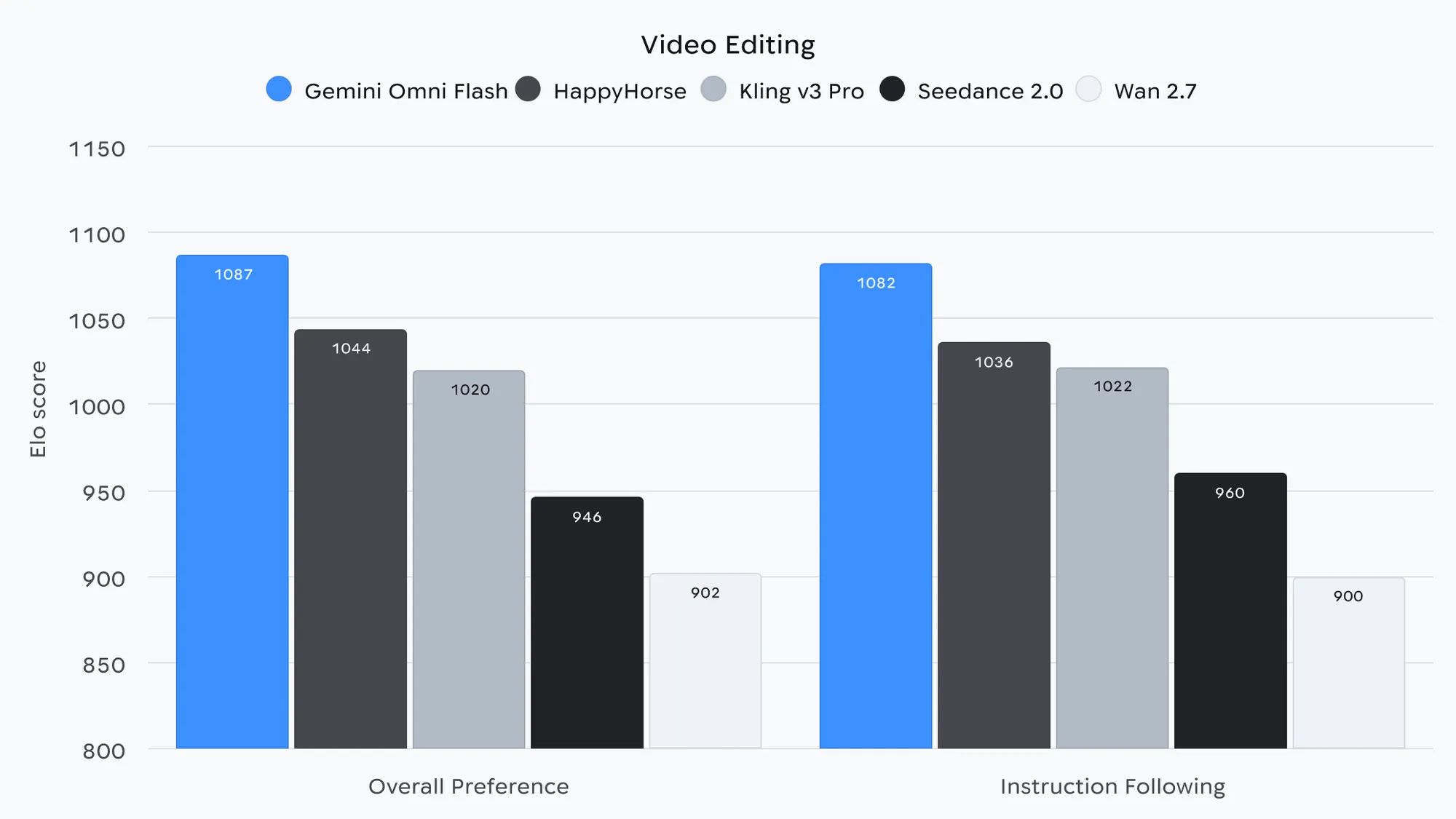
Treat that chart as a vendor claim, because it is one. Google also reports text-to-video results on Meta's MovieGenBench (1,003 prompts) and image-to-video on VBench I2V (355 image and text pairs), which are at least public datasets. Independent human-preference testing tells a tighter story: on Artificial Analysis's image-to-video arena, Omni Flash and ByteDance's Seedance sit within a couple of Elo points of each other, which is a tie. Our 2026 video model roundup has the full leaderboard.
Is Gemini Omni Flash free?
Partly, and where it is free is the most aggressive thing about the launch. Access splits three ways:
- Free: YouTube Shorts and the YouTube Create app. This is a larger install base than every dedicated AI video app combined, and it is the reason Omni Flash is arguably the most capable no-cost video model a general audience can reach.
- Subscription: the Gemini app and Google Flow, for Google AI Plus, Pro, and Ultra subscribers. Google Vids added it on July 16 for paid Workspace accounts, including personal AI avatars that need you to be 18 or older with English as your primary language.
- Paid, no free tier: the API. Video models on the Gemini API are paid-tier only.
Using the Gemini Omni Flash API
Developer access opened June 30, 2026 through AI Studio, the Gemini API, and the Gemini Enterprise Agent Platform, and editing runs through the Interactions API rather than a one-shot generate call. The preview ships with real gaps that the consumer surfaces do not have: you cannot upload audio references, scene extension is not supported, and video references are capped at three seconds and were not being processed correctly at launch. So the model card's "text, image, audio, video" input list describes the family ambition, while the API today is text and images with narrow video editing.
If you are wiring video into a pipeline rather than clicking around an app, the practical question is which model to call for which shot, and that answer changes every few weeks.
Gemini vs Gemini Omni vs Veo 3.1
Three names, three different things, and Google's August releases made the confusion worse. Gemini is the assistant and the text model family, most recently Gemini 3.7 Flash on August 13, 2026, which handles reasoning, code, and chat and generates no video. Gemini Omni is the generative media family, and Omni Flash is its first and so far only model. Veo is the older dedicated video line, still shipping as Veo 3.1 from October 2025.
On price, Omni Flash costs exactly what Veo 3.1 Fast costs at 720p, so the comparison comes down to what each one buys you:
| Model | 720p | 1080p | 4K |
|---|---|---|---|
| Gemini Omni Flash | $0.10/s | Not available | Not available |
| Veo 3.1 Lite | $0.05/s | $0.08/s | Not available |
| Veo 3.1 Fast | $0.10/s | $0.12/s | $0.30/s |
| Veo 3.1 Standard | $0.40/s | $0.40/s | $0.60/s |
Read that table and the choice is clear enough. Omni Flash wins when the work is iterative, because conversational editing saves you the re-roll and Veo has no equivalent. Veo 3.1 wins when you need resolution, and Veo 3.1 Lite wins on raw cost per second if you are generating in volume and getting it right on the first pass. If you are writing prompts against Veo, our Veo 3 prompt guide covers the dialect it responds to.
What Gemini Omni Flash still cannot do
Google's model card is unusually candid here, and the listed weaknesses are the ones you will actually hit. It has trouble "maintaining complete consistency throughout edits," which is the exact failure mode a conversational editing model can least afford, since drift compounds across turns. It struggles "generating scenes with complex motion." And it struggles "rendering perfectly accurate text," so any clip carrying a logo, product name, or on-screen caption needs checking.
Two more constraints are deliberate. Every output carries a SynthID watermark, which is imperceptible but detectable, so Omni Flash output is identifiable as AI-generated by anyone running the detector. And Google has restricted the ability to change a person's speech during editing pending further safety research, which closes the most obvious deepfake path and also rules out legitimate dialogue fixes.
None of that makes it a bad model. It makes it a 720p, ten-second, preview-stage model that is genuinely better than its peers at one specific thing. Plan the work around the ten-second ceiling and the resolution cap, keep a second model on hand for shots that need 4K, and the conversational editing is a real workflow change rather than a demo. For the wider comparison, including the open-weights options you can run yourself, see our best AI video models of 2026 breakdown, and AI UGC video if the output is going to ads.