
Guides
Flux Prompts: What Works on FLUX.2, and Why FLUX.1 Advice Breaks
Flux prompts work as prose, not keyword tags, and Flux has no negative prompt at all. The structure BFL actually recommends, plus token limits for each Flux version.
Flux prompts work best as plain prose, written the way you would describe a photograph to a person, and Flux does not take negative prompts at all. Black Forest Labs states it flatly in its own documentation: "FLUX.2 does not support negative prompts. Focus on describing what you want, not what you don't want." That rule is also why FLUX.1-era prompt advice misleads on FLUX.2: the two generations read text through completely different encoders. They also have completely different length ceilings, so version-blind advice is not slightly stale, it is wrong.
One disclosure up front, because it changes how you should read the comparisons below. Dream Pixel Forge does not ship a Flux text-to-image model. We run FLUX.1 Kontext Pro as our premium image-editing model, and that is the extent of our operating experience with the family. So this guide covers Flux as it runs where it actually runs, on Black Forest Labs' API, on Replicate, and on local weights, and every claim here traces to a primary source rather than to our own bakeoffs. The exception is the example section below, where we ran each prompt ourselves through FLUX.2 [pro] on Replicate rather than illustrate it with somebody else's output. Where a comparison is genuinely useful, we compare against the three models we do operate daily.
On FLUX 3: Black Forest Labs announced it on July 23, 2026 as a multimodal model spanning video, image, audio, and robot action, behind a gated early-access application. The FLUX 3 Image model has not been released, so FLUX.2 is still the current image model and every prompting rule in this guide stands. An open-weight FLUX 3 Dev is promised later in 2026, with no date and no license announced. The detail is in our FLUX 3 breakdown and in the FLUX 3 section further down.
Which Flux are you actually prompting?
Which Flux you are running changes how you should prompt it. FLUX.2 and FLUX.1 need different advice, and the lineup has moved four times since the first release.
| Release | Shipped | What it is | Open weights? |
|---|---|---|---|
| FLUX.1 (pro, dev, schnell) | August 2024 | 12B parameters, a rectified flow transformer, the original text-to-image family | schnell under Apache 2.0, dev non-commercial, pro API only |
| FLUX.1 Kontext (pro, max, dev) | May 2025 | In-context editing: image plus instruction in, edited image out | dev only, non-commercial |
| FLUX.2 (max, pro, flex, dev, klein) | November 2025 | 32B parameters, merges generation and editing, multi-reference native | dev non-commercial, max/pro/flex API only |
| FLUX.2 [klein] 4B | January 2026 | Small, fast, sub-second variant for iteration | 4B under Apache 2.0 (commercial use allowed), 9B non-commercial |
| FLUX 3 | Announced July 23, 2026 | Multimodal model spanning image, video, audio, and robot action | Not yet. See the FLUX 3 section below |
The architectural break that matters for prompting sits between FLUX.1 and FLUX.2. FLUX.1 read your prompt through two text encoders bolted together, CLIP-L and T5-XXL, which is why it tolerated comma-separated keyword piles and why so many FLUX.1-era prompts look like Stable Diffusion tags. FLUX.2 replaced that stack with a single 24B vision-language model, Mistral Small 3.2, doing the text embedding. A language model reads sentences. That is the whole reason the prose-over-tags rule exists, and it is why a prompt that worked well on FLUX.1 dev can land flat on FLUX.2.
How to prompt Flux: what BFL's official Flux prompt guide recommends
Black Forest Labs publishes a prompting guide for FLUX.2, and it is short and specific. Four things in it are worth internalizing.
There is a documented prompt skeleton. BFL frames it two ways. The compact version is Subject + Action + Style + Context. The expanded version is a slot list: [SUBJECT], [LOCATION], [STYLE], [CAMERA SETTINGS], [LIGHTING], [COLORS], [EFFECT], [ADDITIONAL ELEMENTS]. The docs are explicit that this is "a guide, not a requirement" and that you should use only the slots that meaningfully improve the result.
Order is load-bearing. Per the guide, "Word order matters" because "FLUX.2 pays more attention to what comes first." Put the subject first. If your prompt opens with four style adjectives and buries the subject at word thirty, you have told the model that style is the point. This matches what we see across every model we operate: the most common prompt failure is a subject buried under style language, not a missing detail.
Shorter is the starting position, not the fallback. BFL's unified prompt reference opens with "Start short. Add only what changes the image. More words do not automatically mean better results," and later, "Specific detail helps. Filler hurts." This is the opposite of how most people iterate, which is to append adjectives until something changes.
Lighting outperforms everything else per word spent. For the klein variants the docs say outright that "Lighting descriptions have the highest single impact on output quality," and the same guidance tells you to "write in prose, not keyword lists" and to "describe scenes like a novelist." If you only have room for one more clause, spend it on light.
Flux has no negative prompts, so describe the state you want
There is no negative prompt field on FLUX.2 [pro] or [max]. The model-specific quick reference lists "No negative prompts supported" as a hard property, not a limitation to work around. Writing no blur, no extra fingers, not cartoonish in your prompt does not subtract anything, and on a model that weights early tokens heavily it actively costs you attention that should have gone to the subject.
The fix is mechanical: convert every negative into the positive state it implies. "No clutter" becomes "a bare concrete floor, edge to edge." "Not plastic skin" becomes "visible skin texture and fine pores under soft window light." "No text" becomes a description of the surface as blank. This is not Flux-specific advice, incidentally. The same holds on every model we run: negatives are unreliable everywhere, and positive framing beats them on Nano Banana, GPT Image, and Grok Imagine too. Flux is simply the family that removed the escape hatch entirely.
How long can a Flux prompt be?
The ceiling depends on which generation you are on, and the gap is enormous.
- FLUX.1: the CLIP-L encoder reads only the first 77 tokens, and T5-XXL handles up to 512 tokens on dev, 256 on schnell. In the diffusers library you have to pass
max_sequence_length=512explicitly to get the full window. Anything past that is silently truncated, which is why long FLUX.1 prompts often seem to ignore their own final third. - FLUX.2: up to 32,000 tokens, because the text encoder is a full language model. The practical ceiling is nowhere near that.
BFL's own recommended bands are far shorter than either limit: 10 to 30 words for quick concepts and style exploration, 30 to 80 words for most work, and 80 to 300 or more only for complex multi-subject scenes that need precise direction. Treat the medium band as your default. The 32K window exists so that long reference-heavy editing instructions do not get clipped, not so you can write an essay.
Flux prompt examples worth copying
Each is annotated with the lever doing the work, so you can adapt rather than paste. All five were then run verbatim through FLUX.2 [pro] on Replicate, and the image each prompt produced sits directly under it. Every one is the first render back, at a fixed seed, with nothing re-rolled for a nicer result, which is why two of them show you where a prompt did not fully land.
Photoreal portrait. Subject first, one lighting anchor, one lens anchor, nothing else.
A close portrait of a woman in her sixties with short gray hair and deep laugh lines, sitting at a kitchen table by a rain-streaked window. Soft overcast window light from camera left, shallow depth of field, 85mm. Muted blue-gray palette, visible skin texture.
Product hero. Note the explicit background statement, which is the single most common omission in AI product photography prompts on any model.
A matte black ceramic pour-over kettle photographed on a seamless warm gray backdrop, edge to edge, no props. Studio softbox from above and slightly right, one soft shadow falling to the left, gentle specular highlight along the spout. Product photography, sharp focus throughout.
Cinematic scene. Composition language does the heavy lifting here, not adjectives.
A lone signal operator walking a rail bridge at blue hour, seen from a low angle with the trusses forming leading lines toward the horizon. Volumetric haze, sodium-vapor practical lights, teal and amber grade, wide anamorphic framing, strong silhouette.
Typography and layout. Quote the exact string, then place it, then style it.
A vintage letterpress poster on textured cream stock. The words "NIGHT MARKET" appear in large condensed sans-serif capitals across the upper third in deep red #B3221F, with smaller body copy beneath. Flat two-color print, visible paper grain, subtle ink misregistration.
Editorial illustration. One medium, one technique, no competing style words.
An editorial illustration of a shipping container split open to reveal a dense city inside. Gouache on paper, limited palette of ochre, slate and off-white, visible brush texture, flat perspective, generous negative space around the container.
If you want a broader vocabulary for the style slot, our guide to AI art styles covers around thirty style registers with prompt scaffolding for each, and it applies to Flux as cleanly as anywhere else.
Rendering text: put it in quotation marks
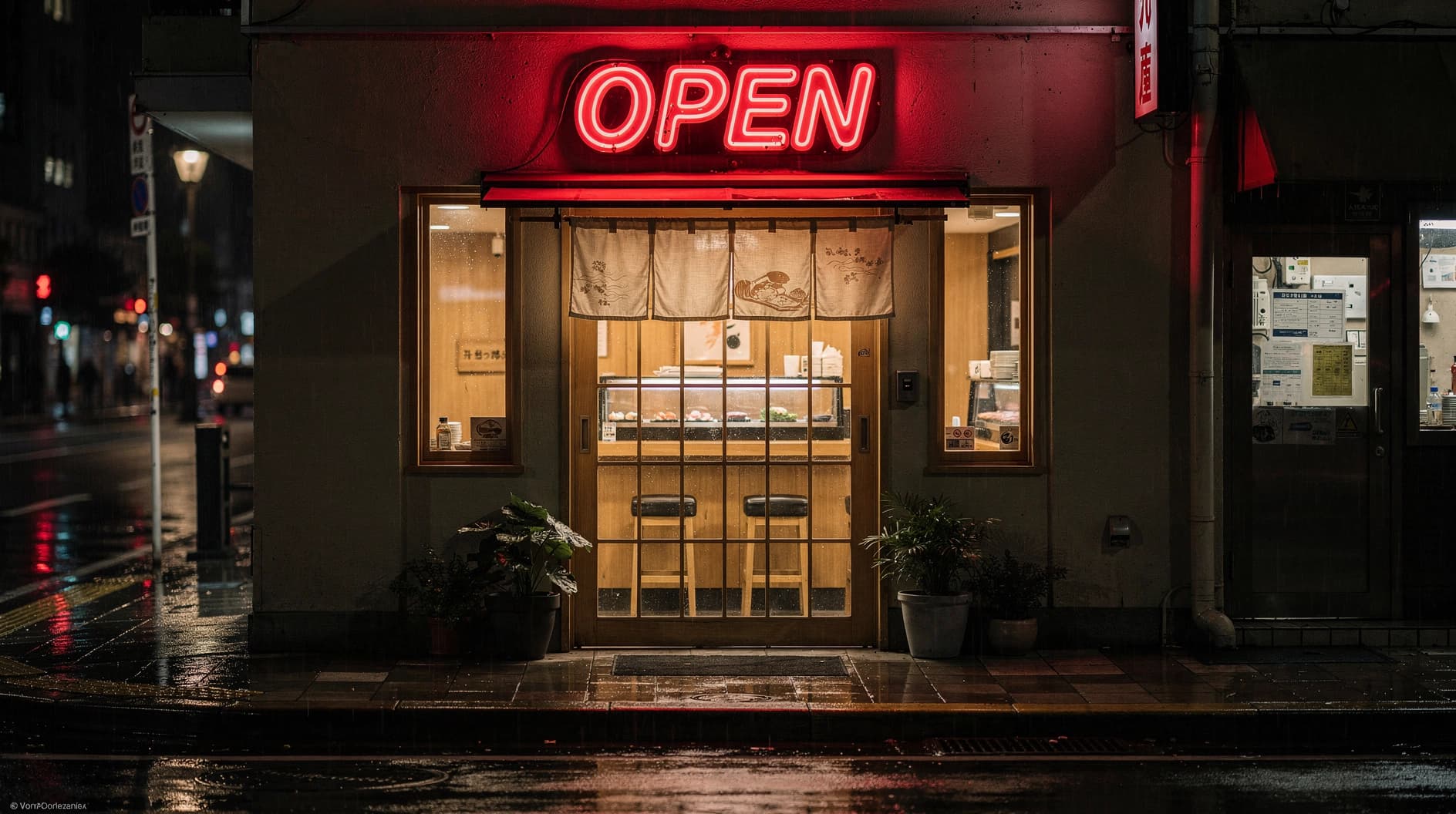
FLUX.2 [pro] and [max] have, per BFL, "excellent typography" and the documented technique is to quote the literal string. The guide's own example is The text "OPEN" appears in red neon letters above the door. Four things improve the hit rate:
- Wrap the exact words in quotation marks. A model asked to invent a slogan renders worse than one handed a fixed string.
- Say where the text sits relative to something else in the frame.
- Describe the type, not just the words: "elegant serif typography" or "bold industrial lettering."
- Use hex codes when the color has to match a brand. The docs call this out explicitly as the route to brand-precise color.
Settle the wording before you prompt the visual. That rule holds on every text-capable model we run, and it is the difference between one generation and eleven.
FLUX dev prompts, guidance, and reference images
If you are running weights yourself rather than hitting an API, the sampler settings matter as much as the words. The FLUX.2 [dev] model card ships example code at guidance_scale=4 and notes that "28 steps can be a good trade-off." On the [flex] variants the API exposes guidance across a 1.5 to 10 range with a 50-step maximum. Higher guidance buys literal prompt adherence and costs you naturalism, which is the same trade every diffusion model makes.
Reference-image limits differ per variant, and they are the reason to pick one variant over another more often than raw quality is. FLUX.2 [pro] accepts eight references through the API at 1MP output, and the usable count drops as output resolution rises against a 9MP combined input and output budget. [flex] takes ten and [dev] takes six. Replicate's own listings describe [pro] as supporting eight reference images and [flex] as ten. If your job is "keep this product identical across twelve scenes," the reference budget is the spec that decides whether the job is possible.
Editing prompts: the one Flux model we do run
FLUX.1 Kontext is the editing branch of the family, and its prompting rules invert the generation rules. BFL's Kontext image-to-image guide puts it as: specify what should change, because the input image already supplies every other piece of visual context. Three rules from that guide carry most of the value:
- Be specific. Exact color names, clear action verbs, detailed descriptions. Vague instructions produce vague edits.
- Preserve intentionally. State what must not move, using constructions like "while maintaining the same facial features, composition and lighting." Anything you do not protect is fair game for the model to reinterpret.
- Avoid pronouns. Write "the woman with short black hair" or "the red car," not "her" or "it." Referring expressions resolve badly.
This is the corner of the Flux family we operate. FLUX.1 Kontext Pro sits in our model registry as the premium image-input model, four credits a render, and it is where identity-preserving edits land when a character has to survive a change of scene. The house rule we enforce on top of BFL's is that edits are surgical: change only X, keep Y and Z and the composition unchanged. Re-describing the whole frame is a regeneration wearing an edit's clothes, and it degrades everything that was already correct.
How Flux prompting differs from the models we run daily
Prompt craft does not transfer between model families, and treating one dialect as universal is the most expensive habit in this field. Here is the honest comparison, with our side drawn from operating these three every day.
| Model | Dialect | Reach for it when |
|---|---|---|
| FLUX.2 | Prose, subject first, no negatives, quoted text, hex colors, 6 to 10 references depending on variant | You want open weights, local control, or a license you own |
| Nano Banana (Gemini image) | Full declarative sentences. Best text rendering of the three. Strongest at reference-driven editing, and it degrades if you stack competing references | Stickers, mockups, labels, layered layouts, lifestyle realism |
| GPT Image 2 | Instruction-following, artifact type named first ("poster", "infographic"), strongest at compositional intent, strictest content filter | Clean branded commercial work and coherent typography |
| Grok Imagine | Write like a photographer, not a designer. Camera and lens language beats adjectives. Front-load the subject. Weak at legible text | Character art and body-forward photoreal renders |
The through-lines are real, though. Subject first, positive framing over negatives, one subject and one scene, and surgical edits are true across all four. The differences are in what each model rewards after that: Flux rewards prose and lighting, Grok rewards camera vocabulary, GPT Image rewards naming the artifact type, Nano Banana rewards literal declarative sentences. Per-model detail lives in the sibling guides: Nano Banana prompts, GPT Image 2, and Grok Imagine prompts. For video the dialects diverge further still, covered in Veo 3 prompts and Seedance prompts.
Dream Pixel Forge runs Nano Banana, GPT Image 2, and Grok Imagine in one studio with a shared credit balance, plus FLUX.1 Kontext Pro for edits, so a bakeoff is three prompts rather than three signups. We are not going to pretend Flux text-to-image is in there. If Flux specifically is what you need, Replicate and BFL's own API are the shortest paths, and the Midjourney alternatives roundup maps the wider field.
FLUX 3: what it changes, and why it does not change your prompts yet
Black Forest Labs announced FLUX 3 on July 23, 2026, and it is a genuine departure rather than a version bump. One set of weights is "jointly trained across image, video, audio, and action prediction modalities within a unified architecture," which puts BFL into video generation with synchronized audio and, via a partnership with mimic robotics being tested at Audi, into robot manipulation. The company reports its previous models have been downloaded over half a billion times.
The launch product is FLUX 3 Video: up to 20 seconds in a single generation with native audio, covering text-to-video, image-to-video, video-to-video, keyframe-to-video, and generative continuation of an existing clip's video and audio. BFL highlights multilingual dialogue and strong typography and animated design work, and publishes preliminary human-preference results for 10-second 720p text-to-video with audio: 69 percent against Grok Imagine Video, 60 percent against Kling v3 Pro, and 77 percent against Runway Gen-4.5. The company labels those numbers preliminary, and the training approach, which it calls Self-Flow, has no published technical report yet, so treat the benchmarks as a vendor claim until independent testing exists.
What FLUX 3 does not do yet is take your image prompts. As of this writing FLUX 3 Video and FLUX 3 Action are in early access behind an application form, FLUX 3 Image "will roll out in the coming weeks," and an open-weight FLUX 3 Dev is promised later this year. BFL's own FLUX 3 model page still shows a "Coming Soon" banner, there is no public pricing, no license text, no API endpoint on Replicate or fal, and no FLUX 3 prompting guide in BFL's docs. So every practical decision in this guide is a FLUX.2 decision, and it will stay one for a while. Expect the prompting rules to hold when Image lands, since the prose-first shift came from the encoder change in FLUX.2 and there is no indication that is being reversed.
Common Flux prompt failures and the single fix for each
One change per failure. Rewriting the whole prompt destroys the information about what was already working.
| Symptom | Fix |
|---|---|
| A prompt that worked on FLUX.1 lands flat on FLUX.2 | Rewrite the comma-separated tag pile as sentences. FLUX.2 embeds your text with a language model, and a keyword list throws away the relationships it reads for. |
| The style landed and the subject did not | The subject is buried behind style language. Open with it, then cut style words until it obeys, because FLUX.2 weights the first words hardest. |
| The scene is right and the light is nowhere | Add exactly one lighting clause. BFL ranks lighting as the single highest-impact description, and one clause outperforms three. |
| The last third of the prompt seems ignored | On FLUX.1 you are past the token window. Cut to 512 T5 tokens, or move to FLUX.2. |
| Artifacts survive every "no artifacts" you add | There is no negative prompt field to put that in, and the words spend early-token attention. Describe the clean state positively instead. |
| The spelling is right but the letterforms wobble | Quote the exact string and name the type style. Then check the variant: documented typography quality belongs to [pro] and [max], not to every branch of the family. |
| A Kontext edit rewrote things you never mentioned | Kontext keeps only what you name. Add "while maintaining the same composition and lighting," and replace pronouns with descriptions. |
| Identity drifts across a set of renders | Attach the same references on every call and spend the multi-reference budget on the character. Adjectives cannot hold a face. |
That last row is worth expanding, because it is where most serious projects stall. No amount of prompt precision keeps one character consistent across fifty images on any model, Flux included, because each generation reads your text and whatever references you attached to that single call and then reinvents everything else. Reference images help enormously and the FLUX.2 multi-reference budget is real, but you are re-supplying the identity by hand every time. Our write-up on consistent AI characters covers what actually holds an identity and why prompt craft alone never will.
The bottom line
Write Flux prompts as prose. Put the subject first, because early tokens are weighted. Start short and add only what changes the image. Spend your marginal words on lighting. Never write a negative, because the model has nowhere to put it. Quote text you want rendered and give hex codes for brand color. And before you reuse a prompt from anywhere, check which generation it was written for, because FLUX.1 advice on a FLUX.2 model is the most common reason a good prompt produces a mediocre image.




