
Guides
Krea 2: What It Is and How Its LoRA Ecosystem Works
Krea 2 is a from-scratch 12B model, not a Flux derivative. Raw vs Turbo, the license revenue cap, and how to train and apply a Krea 2 LoRA.
Krea 2 is Krea's first foundation image model trained from scratch in house, and since late June 2026 two of its checkpoints have been downloadable: Krea 2 Raw and Krea 2 Turbo. That open-weight release is why Krea 2 LoRAs exist at all; before it, training was Krea-platform-only. Krea attaches one instruction to the whole ecosystem: train your LoRA on Raw, run it on Turbo. This guide covers what Krea 2 actually is, how the two checkpoints differ, what the license permits and forbids, where Krea 2 LoRAs live, and how to train and apply one.
One disclosure first: Dream Pixel Forge does not ship any Krea model. We run Nano Banana, GPT Image 2, and Grok Imagine, plus FLUX.1 Kontext Pro for edits. Nothing below comes from our own testing of Krea 2, it comes from Krea's documentation, the model cards, and the license text.
Where Krea 2 sits in Krea AI's model lineage
Krea AI has shipped three distinct things with its name on them, and they are architecturally unrelated in ways that matter if you are copying settings or LoRAs between them.
| Release | Shipped | What it is | Open weights? |
|---|---|---|---|
| Krea 1 | 2025 | Krea's first in-house image model, platform only | No |
| FLUX.1 Krea [dev] | July 31, 2025 | A Black Forest Labs collaboration: BFL's 12B FLUX.1 backbone with Krea's realism post-training. Krea describes it as the open-weights version of Krea 1 | Yes, under BFL's FLUX.1 [dev] non-commercial license |
| Krea 2 | May 12, 2026 | A from-scratch Krea foundation model. No BFL backbone involved | Raw and Turbo, June 2026, under the Krea 2 Community License |
Krea 2 is not a Flux derivative. FLUX.1 Krea [dev] was Krea's aesthetic post-training applied to somebody else's base model, which is why it shipped on BFL's license and behaved like a Flux model. Krea 2 is a new pretrain. LoRAs, samplers, and prompt habits do not carry across that boundary, and a "Flux Krea" LoRA will not load on Krea 2.
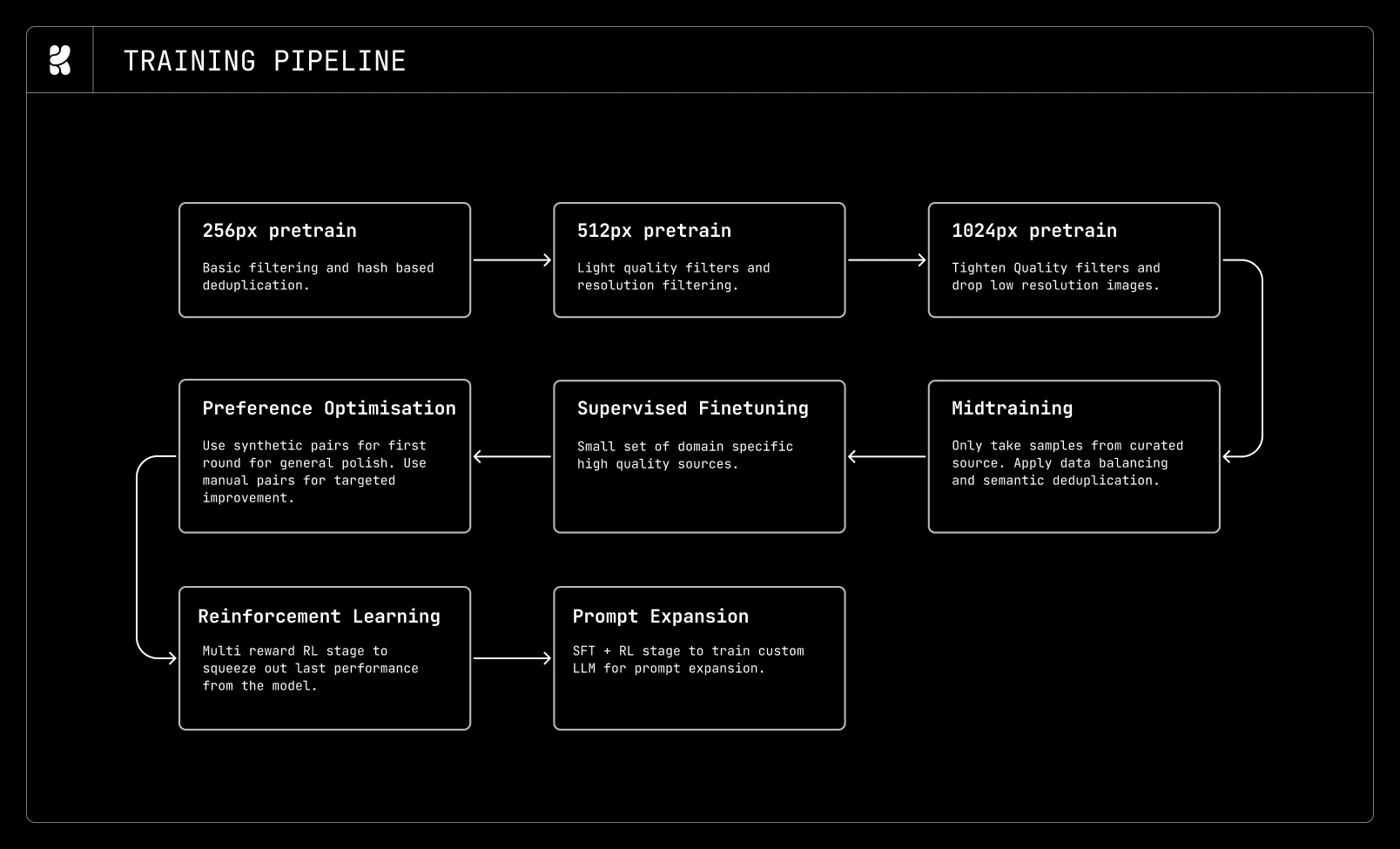
Per Krea's technical report, Krea 2 is a 12B diffusion transformer (the architecture behind most current image models) trained with a rectified-flow objective, the same denoising formulation Flux and SD3 use. Two components matter downstream: the text encoder is Qwen3-VL, a vision-language model that reads full sentences rather than tag soup, and the autoencoder (VAE, the compressor between pixels and the model's working space) is the Qwen Image VAE. Both are borrowed from Alibaba's open Qwen stack, the same lab behind Qwen-Image, and both have to sit in VRAM alongside the transformer during training. The full attention and normalization details are in the technical report. On size, the open-source page gives the backbone as 12B dense; the Hugging Face model card lists the checkpoint at 13B parameters. Training ran at 256px, then 512px, then 1024px, followed by midtraining, supervised finetuning, preference optimization, reinforcement learning with a multi-reward GRPO variant, and optional timestep distillation.
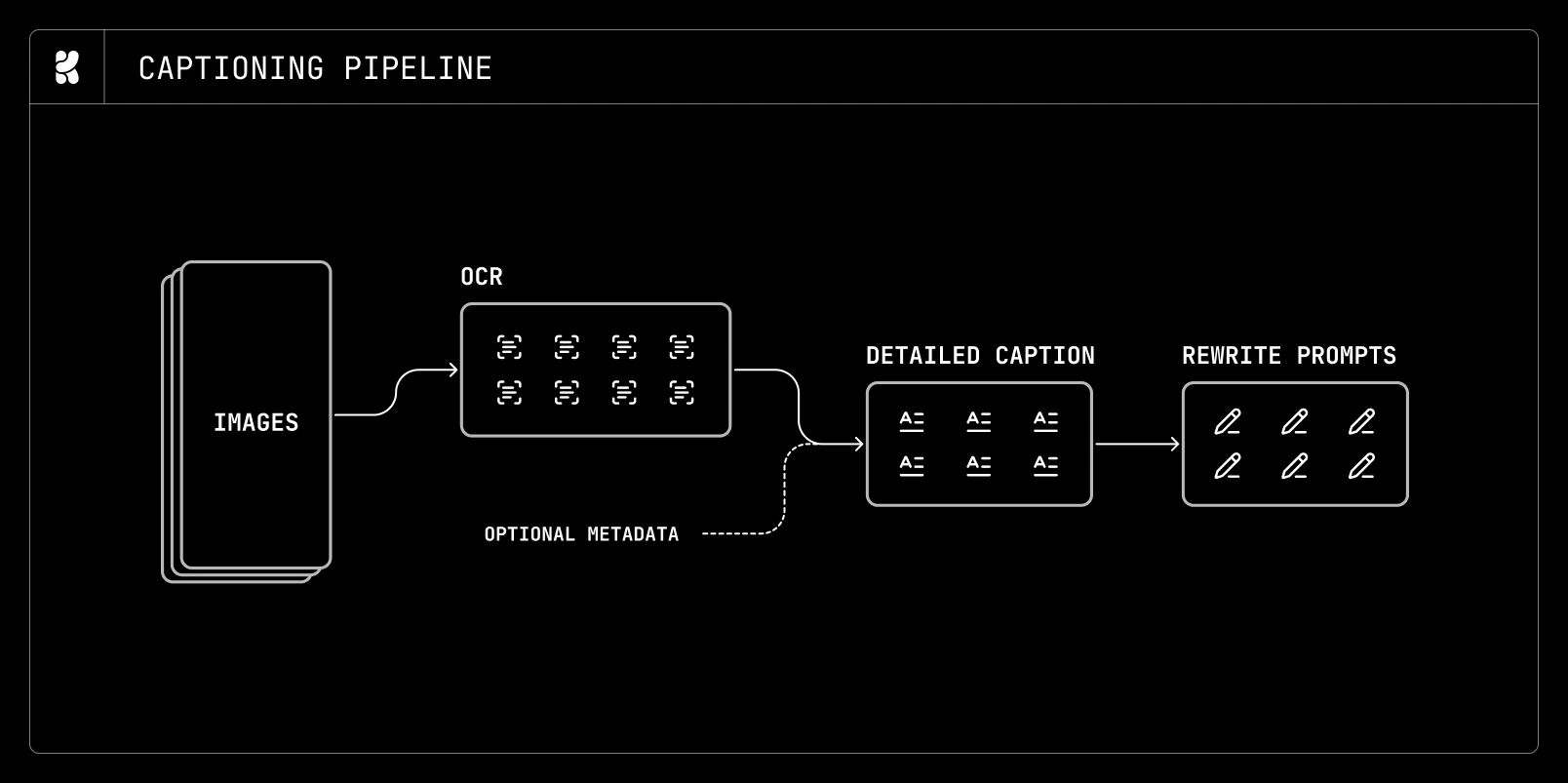
Krea states in that report that Krea 2 places in the top ten on the Artificial Analysis text-to-image leaderboard and second among models from independent labs. That is the vendor's own framing of a third-party leaderboard, and leaderboard positions move, so treat it as a claim with a date on it rather than a fixed property of the model.
Krea 2 Raw vs Krea 2 Turbo: what the difference actually is
Two checkpoints shipped, and they are not a quality tier and a cheap tier. They are a base model and a distilled model, a copy trained to reach the same image in far fewer steps, and each is bad at the other one's job.
| Krea 2 Raw | Krea 2 Turbo | |
|---|---|---|
| What it is | Undistilled base checkpoint | Guidance- and timestep-distilled |
| Steps | 52 | 8 |
| Guidance (CFG, how hard the model is pushed toward the prompt) | 3.5 | 0.0, disabled |
| Timestep shift (mu) | Default | 1.15 |
| Resolution | Up to 1K | 1K to 2K, default 1024 and customizable to 2048 |
| Intended use | Fine-tuning, LoRA training, research | Fast inference |
Those numbers come from the official inference repository, and the CFG row is the one people trip on. Turbo is distilled to run without classifier-free guidance. Setting a nonzero CFG on Turbo does not sharpen prompt adherence, it fights the distillation. Likewise, running Raw at 8 steps produces mush, because Raw was never distilled to reach an image in that budget.
The instruction Krea repeats across the model card, the repository, and the open-source page is the one that defines the ecosystem: train LoRAs on Raw, apply them on Turbo. Krea states that LoRAs trained on Raw are designed to express strongly on Turbo. That is unusual: in most open-weight families you train against the checkpoint you intend to run. Here the diverse, malleable base is deliberately the training surface and the fast distilled model is deliberately the inference surface.
Is Krea 2 open source?
No, and the distinction is not pedantry here, it is a business decision you have to make before you build on it. Krea 2 is open weights: the files are public and downloadable. It is not open source in the OSI sense, because the Krea 2 Community License Agreement restricts who may use it commercially.
The terms that decide whether you can ship with it:
- A revenue ceiling on commercial use. The agreement permits commercial use of the model, derivatives, and outputs only if you, including affiliated entities under common ownership or control, have total company-wide annual revenue under one million US dollars. Cross that line and you must stop commercial use and obtain an enterprise license.
- You own your outputs. The agreement states that you own all outputs you generate, subject to compliance, and that Krea claims no ownership of outputs.
- Derivatives must carry the name. If you distribute a fine-tune, distillation, or merge, the agreement requires you to begin the model name with "Krea", in the form "Krea 2 [Your Model Name]", and to include a notice that Krea 2 is licensed under the Krea 2 Community License Agreement. Community uploads frequently ignore this, which does not make it optional for you.
- Downstream recipients are bound too. Distributing a derivative means passing the same terms along.
- Deployers must filter. The model card requires content filtering or an equivalent review process if you are serving the model to others, and puts responsibility for outputs on the user.
Read the agreement itself against your own situation rather than a summary of it. The practical shape is: a solo creator or a small studio under the revenue threshold can use Krea 2 commercially for free, and anything larger needs a paid enterprise license through Krea. That is a different deal from FLUX.2 [klein] 4B under Apache 2.0 (an open-weight Flux model with no revenue cap), and it is the single fact most worth checking before a Krea 2 LoRA becomes load-bearing in a commercial pipeline.
Where the Krea 2 LoRA ecosystem actually lives
Krea 2 LoRAs are spread across three places, and each one serves a different kind of user.
Hugging Face, for Krea's own reference LoRAs. The krea organization hosts the Raw and Turbo checkpoints alongside a set of nine first-party style LoRAs: retroanime, sunsetblur, vintagetarot, rainywindow, neondrip, dotmatrix, darkbrush, kidsdrawing, and softwatercolor. These are the ones to study before you train your own, because they are the reference implementation of the train-on-Raw, run-on-Turbo pattern and each card shows the exact trigger phrase and settings.
Civitai, for the community catalog. Civitai runs a Krea 2 ecosystem hub with the checkpoints, community LoRAs, and ComfyUI workflows under a "Krea 2" base-model tag, and it supports training a Krea 2 LoRA on-site without a local GPU. The catalog is large enough that any specific count goes stale fast. What is stable is the shape of it. Browsing the hub, the rough breakdown is that style LoRAs dominate, followed by utility LoRAs such as brightness and detail sliders, followed by filter-bypass adapters that exist because the base model has guardrails.
Krea's own Train tool, for people who do not want to touch a GPU. Krea shipped Krea 2 LoRA training on May 21, 2026, nine days after the model launched and a month before any weights were public. Per Krea's documentation, you need at least three images, and 10 to 30 improve generalization. You can train a style, a character, or an object or product. On completion Krea assigns a style code you apply in the Image tool, with a strength dial and support for stacking, so a character LoRA and a style LoRA can run together. Platform training targets Krea 2 Medium or Krea 2 Large, and Krea's framing is that Large trains stronger while Medium trains faster.
Worth keeping straight: Medium, Large, and Turbo are the platform variants, and Raw and Turbo are the open-weight ones. A LoRA trained in Krea's Train tool lives on Krea's platform. A LoRA trained locally on Raw is a safetensors file you own and can run anywhere the license allows.
How to train a Krea 2 LoRA locally
The repository names Hugging Face Diffusers, the Ostris AI Toolkit, fal, and Kohya as supported training paths. The workflow is the same in all of them: point the trainer at Krea 2 Raw, train, then load the resulting adapter onto Turbo for inference.
The complication is memory, and it is not the checkpoint size alone. Krea 2 training holds three things in VRAM at once: the Qwen3-VL text encoder, the Qwen Image VAE, and the 12B transformer. Community reports through late June 2026 described the AI Toolkit implementation as lacking an offload mechanism during the main training loop, which put a straightforward 12GB run out of reach.
The most concrete public data point on the low end is a Civitai walkthrough published July 14, 2026 by SirMick, training on an RTX 3060 with 12GB of VRAM and 64GB of system RAM using Musubi Tuner. Their reported configuration and results, which are one person's numbers on one machine rather than an official spec:
- LoRA rank and alpha 16/16, learning rate 1e-4, AdamW 8-bit, batch size 1, 500 max steps saving every 50.
- Resolutions validated at 512x512 and 1024x256 with aspect-ratio bucketing, each image paired with a
.txtcaption. --fp8_base --fp8_scaledquantization plus--blocks_to_swap 20,--block_swap_h2d_only,--block_swap_ring_size 2, and gradient checkpointing.- Speed, in their reported runs: bf16 without swapping ran out of memory outright. fp8 without swapping fit only by overflowing real VRAM into shared system memory, and that spill is what produced roughly 85 to 113 seconds per step, unstably. With block swapping keeping the active layers inside real VRAM, steps dropped to roughly 7.8 seconds and stayed stable, at a peak of around 11.94GB of 12GB.
- Their warning about system RAM is the part people skip: block swapping moves inactive transformer blocks to host memory, so 32GB gets tight and 64GB is what was tested.
Separately, on July 4, 2026 the AI Toolkit gained reference-image training for Krea 2, configured with arch: krea2 and model_kwargs.edit: true, which encodes a reference image through Qwen3-VL alongside the prompt and feeds it into the transformer. That opens edit-style LoRAs, trained on paired before and after images with instructions, reportedly converging in the low thousands of steps.
If none of this appeals, both Civitai and Krea's Train tool will do the training on their hardware, and for most people chasing a style or a character that is the correct trade.
Using a Krea 2 LoRA: triggers, strength, and stacking
Krea's first-party LoRAs set the pattern, and community LoRAs mostly follow the same conventions.
Trigger phrases are phrases, not tokens. The retroanime card uses "Purple retro anime style" appended to the prompt, as in A deer grazing in the forest, Purple retro anime style. That is a readable descriptive phrase rather than an invented token like ohwx, which fits a model whose text encoder is a vision-language model reading sentences. If you train your own, caption in natural language and pick a trigger phrase you would plausibly write anyway.
Strength 1.0 is the documented starting point. Krea's LoRAs and the ComfyUI examples all specify 1.0, not the 0.7 to 0.8 hedge that carried over from earlier open-weight families. Start at 1.0, and reduce only when the style is visibly eating the subject.
Inference settings follow the checkpoint, not the LoRA. Loading a LoRA onto Turbo does not change Turbo's numbers: 8 steps, guidance 0.0. The retroanime card shows exactly that, loading the adapter onto krea/Krea-2-Turbo and generating at 8 steps with guidance_scale=0.0.
Stacking is supported, with the usual caveat. Krea documents combining a character LoRA with a style LoRA on the platform. The failure mode is the same one every LoRA ecosystem has: two adapters that both encode a full aesthetic will fight, and the result reads as neither. Stack adapters that own different axes, one identity and one look, and drop rather than dilute when they conflict.
Style references and sliders: the control surface that is not a LoRA
A large share of what people reach for LoRAs to do, Krea 2 exposes as first-class controls. Per Krea's style reference documentation, you can attach up to four style references, each with its own strength slider defaulting to 50 percent. At 20 percent the reference reads as a tint and the prompt drives. At 80 percent the reference takes over and can override subject detail. Moodboards handle the same job with unlimited images when you are exploring rather than locking a look.
Three generative sliders run from minus 100 to 100 with 0 as neutral: intensity, from muted to heavily stylized; complexity, from clean and minimal to dense; and movement, from static to strong pose and camera energy.
The practical rule is that a style reference is the right tool for one job and a LoRA is the right tool for a repeated one. If you need a look once, attach a reference. If you need the same look across a hundred images next quarter, train the LoRA. Krea also ships the style-reference mechanism itself as a downloadable LoRA for local ComfyUI use.
If you want a wider vocabulary to put in the prompt regardless of which control you use, our guide to AI art styles covers roughly thirty style registers with prompt scaffolding for each, and that vocabulary is model-agnostic.
Running Krea 2 in ComfyUI, and how much VRAM it takes
ComfyUI has native Krea 2 workflow documentation. A text-to-image run needs three files: the diffusion model, typically krea2_turbo_fp8_scaled.safetensors, the qwen3vl_4b_fp8_scaled text encoder, and the Qwen Image VAE. Style-reference workflows swap in an int8 diffusion model and add the style-reference LoRA. Krea's style LoRAs go in ComfyUI/models/loras/ at strength 1.0.
Neither the Hugging Face card nor the ComfyUI documentation publishes a VRAM minimum. Every figure circulating is community arithmetic from file sizes. The consensus estimate is that an fp8 Turbo checkpoint lands around 13GB of weights, which puts a practical floor near 16GB and makes 24GB comfortable, while bf16 roughly doubles that and needs 32GB or offloading. None of those numbers include the text encoder, the VAE, or activation memory during sampling, so budget above them rather than at them. Community quantizations push lower, and nvfp4 builds target 8GB, with the usual quality cost that quantization always carries.
Vendor-side, Krea describes Turbo as producing a native 2K image in about two seconds on consumer hardware. That is a claim about their reference setup, not a promise about yours.
For hosted access without local weights, fal launched as an official Krea 2 API partner on May 27, 2026, and Krea's open-source page also lists Replicate, Cloudflare, Together AI, SGLang, and the major clouds as deployment paths.
Can Krea 2 edit images?
On Krea's platform, yes, through a separate Edit mode that trained style codes apply to alongside image generation and the Enhancer. In the open-weight release, the answer is narrower: Raw and Turbo are text-to-image checkpoints, and image editing is not a native capability of the files you download. The reference-image path exists through the training adapter added to the AI Toolkit in July 2026, with a companion ComfyUI node handling reference encoding and model patching at inference. That is a community-built route to edit-style behavior, not a shipped edit model.
If instruction-based editing is your actual requirement rather than generation, that is a different model class, and the right move is to use a model built for it. We route identity-preserving edits to FLUX.1 Kontext Pro and reference-driven edits to Nano Banana, both of which take an image and an instruction natively.
How Krea 2 compares to the models we run
Prompt craft does not transfer between model families, and neither does the reason you would pick one. Our side of the table is drawn from operating these three every day, the Krea 2 side from its documentation.
| Model | Its actual advantage | Reach for it when |
|---|---|---|
| Krea 2 | Open weights you can fine-tune, style control as a first-class surface, a real LoRA ecosystem, 8-step inference | You want a trainable model you host yourself and your revenue is under the license ceiling |
| Nano Banana (Gemini image) | Best text rendering of the three, strongest reference-driven editing, literal instruction following | Stickers, mockups, labels, layered layouts, lifestyle realism |
| GPT Image 2 | Strongest compositional intent, coherent typography, strictest content filter | Clean branded commercial work, posters, infographics |
| Grok Imagine | Camera and lens vocabulary over adjectives, loosest filter, body-forward realism. Weak at legible text | Character art and photoreal portrait work |
Krea 2 gives you a trainable base and asks you to manage weights, VRAM, and a license. The three hosted models give you no weights and no training, and in exchange there is nothing to install and no revenue threshold to watch. Neither is the right answer in general, and both are the right answer for specific jobs.
The prompt through-lines hold across all four: put the subject first, describe the state you want instead of writing negatives, keep one subject and one scene, and make edits surgical. What each rewards after that differs, and the per-model detail lives in the sibling guides: Nano Banana prompts, Grok Imagine prompts, and Flux prompts.
If your interest in Krea 2 is really about locking a character down, the LoRA is the strongest tool in this space and it is also the most work. Training an identity adapter means curating a dataset, running the job, and maintaining the artifact. Our write-up on consistent AI characters covers what actually holds an identity across a series and what reference-based approaches buy you without a training run. And if you would rather compare hosted models before committing to a local pipeline, Dream Pixel Forge runs Nano Banana, GPT Image 2, and Grok Imagine on one credit balance, which makes a bakeoff three prompts instead of three signups. Krea 2 is not among them, and for Krea 2 specifically the shortest paths are Krea's own platform, fal, or the weights on Hugging Face.
The bottom line
Krea 2 is a from-scratch 12B diffusion transformer with a Qwen3-VL text encoder, not a Flux derivative, and its open-weight release is two checkpoints with opposite jobs: Raw at 52 steps and guidance 3.5 for training, Turbo at 8 steps and guidance 0.0 for inference. Train on Raw, run on Turbo, start LoRAs at strength 1.0, and use descriptive trigger phrases rather than invented tokens. Local training is feasible on 12GB with fp8 and block swapping, but the memory budget is real and no official minimum exists. Before any of that becomes a dependency, read the Krea 2 Community License: commercial use is free only under one million dollars in company-wide annual revenue, and derivative models have to carry the Krea name.




