Guides
Qwen Image 3.0: What It Is and Where You Can Run It
Qwen Image 3.0 ships a 4.5k token prompt window and 10px text rendering, but no open weights. What launched, where it runs, and how to prompt it.
Qwen Image 3.0 is the third generation of Alibaba's Qwen-Image family, and the headline numbers in its launch announcement are a 4.5k token prompt window, legible text rendered as small as 10 pixels, and native rendering across 12 languages. The bigger fact is missing from those numbers: unlike every Qwen image model that shipped in 2025, Qwen-Image-3.0 arrived with no downloadable weights, no license text, no parameter count, and no technical report. If you came here to run it locally, that is the answer, and the rest of this guide covers what you can run instead.
One disclosure up front: Dream Pixel Forge does not ship any Qwen image model today. We run Nano Banana, GPT Image 2, and Grok Imagine, plus FLUX.1 Kontext Pro for edits. Qwen-Image-3.0 is on the list to add once its access opens. Nothing here comes from our own testing of Qwen-Image-3.0; it comes from Qwen's announcement, Alibaba Cloud's Model Studio documentation, the QwenLM repositories, and Hugging Face model cards.
What Qwen Image 3.0 is
Qwen frames the release around a single word, "Real" (实), positioned as a step past the earlier generations: Qwen-Image-1.0 was pitched on "Precision" and Qwen-Image-2.0 on "Precision, Variety, Completeness, Beauty, and Authenticity." The stated goal is a shift from good-looking to useful, or in the announcement's own framing, making image generation "a truly deployable productivity tool." Three capabilities carry that claim.
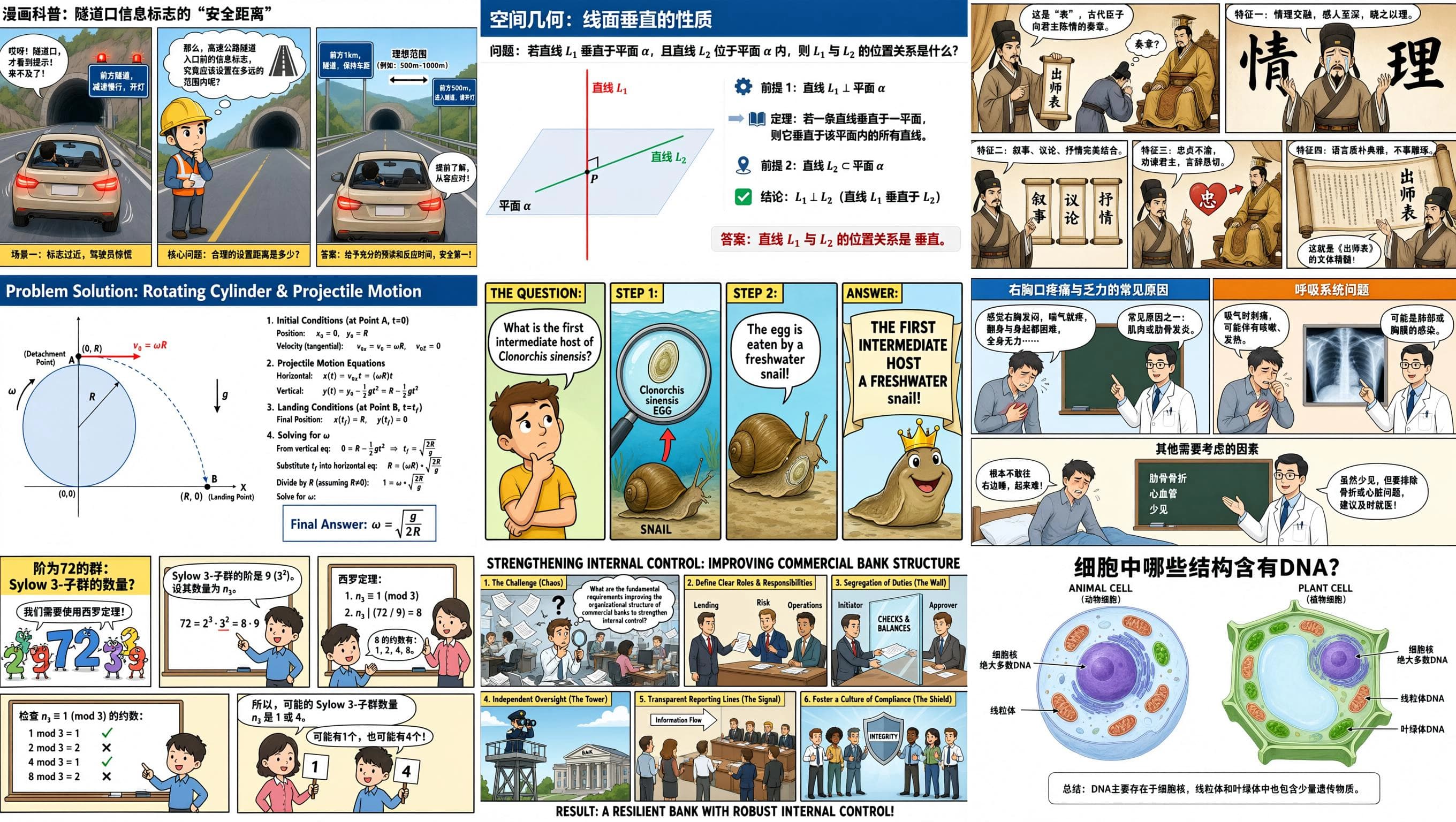
Rich content, meaning very long prompts. The model accepts up to 4.5k tokens of instruction. Qwen's showcase example is a 3x3 grid where every cell is a separate complex infographic, a tunnel safety comic, a spatial geometry lesson, physics projectile motion, a parasitology explainer, the Sylow theorems, a bank internal-control diagram, and more, described in a single 3.7k-token prompt and generated in one pass rather than stitched from nine images. A second demo nests four interfaces inside each other from one instruction: a VSCode window containing a Qwen Chat window containing a WeChat window containing a coffee poster.
Authentic details, meaning small text and micro-texture. Qwen claims precise rendering of text down to 10px, and demonstrates it on a whale shark infographic, a full page of an algebraic geometry paper with multi-line LaTeX derivations, and a newspaper layout. The same section shows handwritten red annotations overlaid onto a book page as an editing task, and a damaged ink painting restored with the original brushwork preserved.
Deep knowledge, meaning world knowledge and UI mimicry. The announcement claims coverage of 12 languages, multiple fonts, over 100 artistic styles, and a range of real UI interfaces, with Japanese, Korean, and Spanish examples shown. It also states the model can connect to the internet to retrieve current information, illustrated with a weather forecast image for a specific date.
All of the above are vendor demonstrations. There is no third-party evaluation of Qwen-Image-3.0 to check them against: Qwen published no benchmark scores with the release, and with API access invite-gated nobody has run it at evaluation scale. Read them as claims, not measurements.
What changed against the earlier Qwen image models
Eight releases in twelve months, and the versions are not a straight line. Through 2025 Qwen ran two parallel tracks, generation and editing, then merged them into the unified 2.0 model. This table is assembled from the news log in the QwenLM/Qwen-Image repository and the release blogs.
| Release | Shipped | What it is | Open weights? |
|---|---|---|---|
| Qwen-Image | August 4, 2025 | 20B foundation model, built around complex text rendering, especially Chinese | Yes, Apache 2.0 |
| Qwen-Image-Edit | August 18, 2025 | The editing branch: image plus instruction in, edited image out | Yes, Apache 2.0 |
| Qwen-Image-Edit-2509 | September 22, 2025 | Monthly editing iteration, adds multi-image editing | Yes, Apache 2.0 |
| Qwen-Image-Layered | December 19, 2025 | Layer-aware generation, with its own research paper | Yes, Apache 2.0 |
| Qwen-Image-Edit-2511 | December 23, 2025 | Editing consistency, with popular community LoRAs folded into the base model | Yes, Apache 2.0 |
| Qwen-Image-2512 | December 31, 2025 | Generation track refresh: finer detail and stronger photorealism, notably on people | Yes, Apache 2.0 |
| Qwen-Image-2.0 | February 10, 2026 | Merges generation and editing into one model. 1k-token instructions, native 2K resolution, smaller and faster architecture | No. Qwen Chat and API only |
| Qwen-Image-3.0 | July 2026 | 4.5k-token instructions, 10px text, 12 languages, UI and world knowledge | No. See below |
Measured against Qwen-Image-2.0 specifically, the concrete deltas are the prompt window going from 1k to 4.5k tokens and the small-text and multilingual claims. Everything else in the announcement is a demonstration rather than a spec. Note also that 2.0, not 3.0, was where the open-weight break happened: the repository's news entry for 2.0 points readers to Qwen Chat and carries none of the "we released the weights" language that accompanies every 2025 release. Qwen-Image-3.0 continues that pattern rather than starting it.
Is Qwen Image 3.0 open source, and what is the license?
Qwen-Image-3.0 is not open source and has no published license. There is no Qwen/Qwen-Image-3.0 repository on Hugging Face or ModelScope, no model card, no parameter count, and no arXiv technical report. The QwenLM/Qwen-Image README does not mention 3.0 at all. As of this writing there is also no official statement committing to a future weights release.
The models that are open are all Apache 2.0, which is genuinely permissive, commercial use included, and that license is stated on each model card:
- Qwen/Qwen-Image, 20.4B parameters, Apache 2.0, with a technical report
- Qwen/Qwen-Image-2512, Apache 2.0
- Qwen/Qwen-Image-Edit-2511, Apache 2.0
- Qwen/Qwen-Image-Layered, Apache 2.0
So the practical position is a split lineup. The open branch stopped at the December 2025 models, and the flagship branch, 2.0 and 3.0, is a hosted product. If your reason for choosing Qwen was that you could download it, the model you can download is Qwen-Image-2512 or Qwen-Image-Edit-2511, not 3.0.
Where the Qwen AI image generator runs today
Two places, and one of them is gated.
Qwen Chat. The announcement's only call to action is chat.qwen.ai with the text-to-image feature selected. This is the free surface, and with the API invite-gated it is the only one most people can reach.
Alibaba Cloud Model Studio. The API model id is qwen-image-3.0-pro, and Alibaba's model selection page marks it "currently in invite-only testing" in the International region. Its documented envelope: text-to-image and editing under the same model id, up to 6 images per call, maximum resolution 2048x2048, recommended for complex layout generation, small-text rendering, and multilingual font support. Pricing is listed as "Limited-time free," against $0.075 per image for qwen-image-2.0-pro and $0.035 for qwen-image-2.0.
Worth flagging: Alibaba's Qwen image API reference has not caught up with the launch. It does not list qwen-image-3.0-pro among its models, and the prompt ceiling it documents is 1,300 tokens for the 2.0 series and 800 for the rest. The 4.5k figure appears in the announcement and nowhere in the API docs yet. If you get invite access, verify the real limit against the endpoint rather than the blog post.
Everywhere else carries the older, open Qwen models only. Replicate's Qwen collection, NVIDIA's build catalog, and the ComfyUI ecosystem all host the 2025 family. None of them has 3.0, and none of them can until weights exist.
Running Qwen image models locally on ComfyUI
This section is about the open models, since 3.0 is not among them. ComfyUI supports Qwen-Image and Qwen-Image-Edit natively, with an official workflow tutorial rather than a custom-node scramble.
The constraint is memory. At 20B parameters, the fp8 build (weights stored at 8-bit precision to halve memory) in ComfyUI's own tutorial consumes roughly 86 percent of a 24GB card, so a 24GB GPU is the comfortable floor for fp8. Anything smaller means community GGUF quantizations, the same trick pushed further, at a visible quality cost. Weights come from Hugging Face or ModelScope, and third-party acceleration projects such as Qwen-Image-Lightning publish distilled variants that cut step counts. If your interest in Qwen is specifically local, unlicensed, offline generation, the December 2025 models are a real and capable option, and they are the ones to plan around.
How to write Qwen image prompts
Qwen published no prompting guide with 3.0, and the family has real dialect quirks: it takes a genuine negative_prompt unlike most current models, Alibaba's hosted API rewrites your prompt by default unless you disable prompt_extend, and its long context rewards layout instruction rather than style adjectives. The full treatment, with the prompt formula, copy-paste examples for posters and bilingual layouts, and the editing rules, is in our Qwen image prompts guide.
Two operational parameters worth knowing before you build anything on the API: output is PNG, and generated image URLs expire 24 hours after the call, so download immediately. There is also a watermark flag, off by default, that stamps a Qwen-Image mark in the bottom-right corner.
Qwen Image 3.0 compared to the models we run
Prompting habits are model-specific, and the useful comparison is which model to reach for, not which is best. Our side of the table is drawn from operating three models daily, the Qwen side from documentation.
| Model | Dialect and strengths | Reach for it when |
|---|---|---|
| Qwen-Image-3.0 | Very long structural prompts, real negative prompts, LLM prompt rewriting on by default, small text and multilingual layout claims, 2048x2048 ceiling | You have invite access and the job is dense, text-heavy, multilingual layout |
| Nano Banana (Gemini image) | Full declarative sentences. Best text rendering of the three we run, strongest at reference-driven editing, degrades if you stack competing references | Stickers, mockups, labels, layered layouts, lifestyle realism |
| GPT Image 2 | Instruction-following, artifact type named first, strongest at compositional intent, strictest content filter | Clean branded commercial work and coherent typography |
| Grok Imagine | Write like a photographer, not a designer. Camera and lens language beats adjectives, subject front-loaded. Weak at legible text | Character art and body-forward photoreal renders |
On measured quality there is one data point, and it is Qwen's own. Qwen-Image-Bench is an Apache 2.0 evaluation toolkit Qwen publishes, scoring 1,000 prompts across five dimensions and 56 facets with a fine-tuned judge model. Its top-five table reads: GPT Image 2 at 64.69 overall, Nano Banana 2.0 at 59.82, GPT Image 1.5 at 59.65, Nano Banana Pro at 59.45, and Qwen Image 2.0 Pro at 57.84. That is Qwen's own benchmark placing Qwen fifth, which is a point in its favor as a benchmark. It also predates 3.0, so it tells you where the previous flagship sat, not where this one does.
Per-model prompting detail for the three we operate lives in the sibling guides: Nano Banana prompts, GPT Image 2, and Grok Imagine prompts. The open-weight comparison most people are actually running is Qwen against Flux, covered in Flux prompts, and if you need a wider style vocabulary for any of them, AI art styles covers around thirty registers with prompt scaffolding.
If what you want is to compare models rather than commit to one, Dream Pixel Forge runs Nano Banana, GPT Image 2, and Grok Imagine in one studio on a shared credit balance, so you can put the same brief through all three without opening three accounts. Qwen is not among them today. Qwen-Image-3.0 is on the list to add, and the fastest way to get it the day it lands is to have an account already: create one and the new engine shows up in the same model dropdown, on the same credits, with no migration. For Qwen right now, Qwen Chat is the free path to 3.0, Hugging Face is where the open 2025 weights live, and Model Studio is where the API sits once the invite gate opens.
The bottom line
Qwen Image 3.0 is a hosted flagship aimed squarely at dense, text-heavy, multilingual production work: newspapers, storyboard frames, exam papers, infographics, UI mockups. The 4.5k prompt window and the 10px text claim are the real differentiators, and they point at layout jobs rather than pretty pictures. What it is not is the open-weight Qwen people spent 2025 downloading. That branch is still there, still Apache 2.0, and still worth running locally, but it ends at the December 2025 models. Until Qwen publishes weights, a license, or a technical report for 3.0, evaluate it as a product you rent, not a model you own.