Guides
Qwen Image 2.1: Open Weights, New Features, and License
Qwen Image 2.1 is downloadable for generation and editing. See its transparent output, 10-image references, ComfyUI setup, and research-only license.
Qwen-Image-2.1 is downloadable now. Qwen released the weights on September 20, 2026, for a model that generates images and edits existing ones in the same pipeline. Its practical additions are native transparent output, up to ten reference images, and 2K generation. The catch for anyone making work for clients or a business: the Qwen Research License permits research and evaluation but requires a separate license for commercial use. Downloadable does not mean Apache 2.0 in this release.
This is a source-based release guide, not a hands-on quality review. Dream Pixel Forge does not offer Qwen-Image-2.1 in its model picker, and we have not tested its output ourselves. The specifications and examples below come from Qwen's repository, its model card, and ComfyUI's release page.
What changed in Qwen Image 2.1?
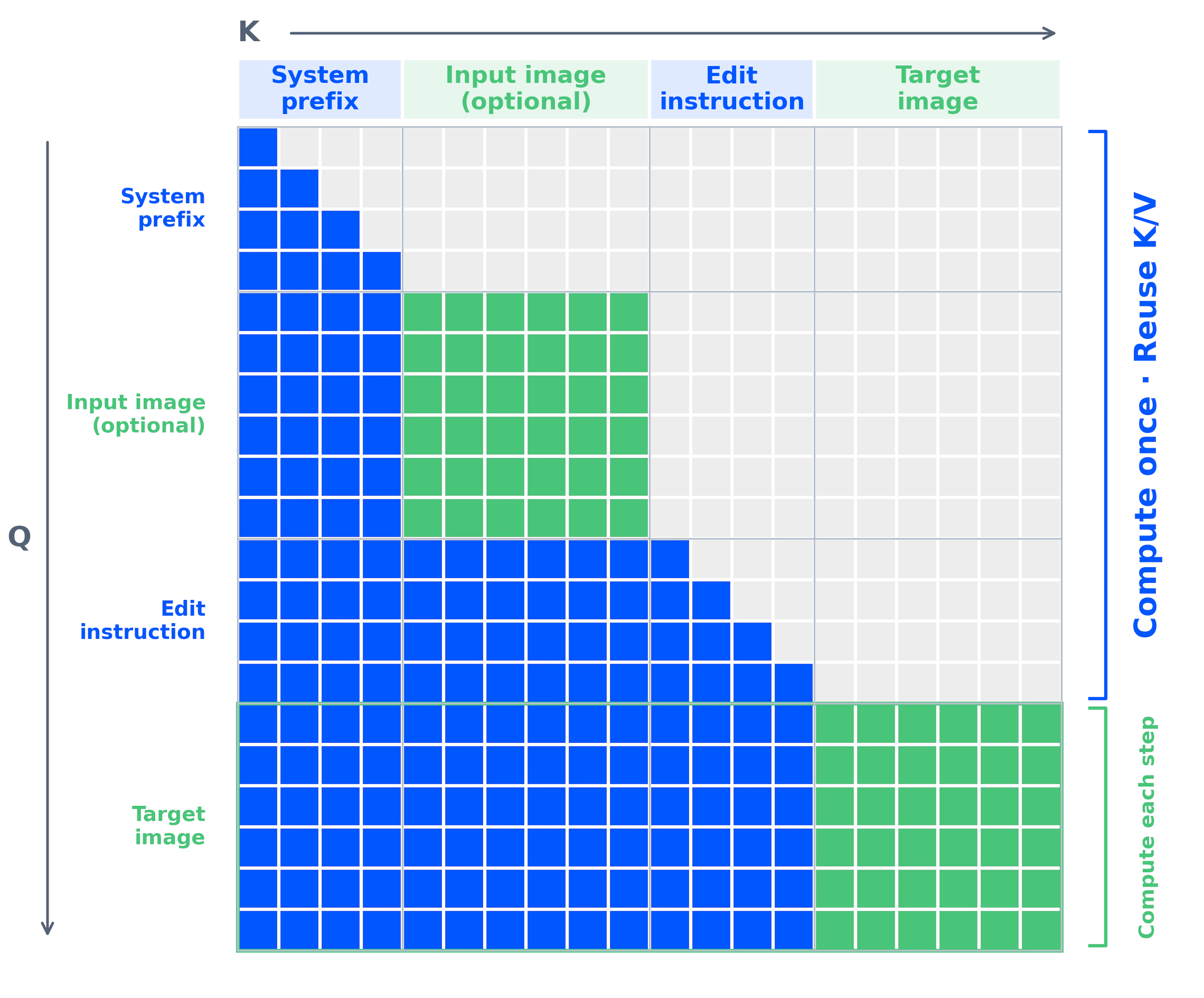
The model combines text-to-image and image editing, including multi-image composition, in one checkpoint. Qwen describes the visual generator as a 7B-parameter, 32-layer diffusion transformer. A separate Qwen3-VL 8B encoder reads instructions and reference images, so the 7B figure does not describe every component you load. Qwen also documents an RGBA autoencoder for transparency and a prefix cache that reuses the instruction and input-image representation across denoising steps.
| Capability | What Qwen publishes | Why it matters |
|---|---|---|
| Transparent output | Native RGBA generation and editing | Make a cutout or sticker without a separate background-removal step when the result has usable alpha. |
| References | Up to 10 input images in Qwen's pipeline | Combine people, products, clothes, or other visual inputs in one edit. Judge identity and product details against the inputs. |
| Local edits | Circles, painted annotations, or masks can mark the area to change | Give the model a location as well as an instruction. |
| Resolution | Native 2048 × 2048 square output, with documented landscape and portrait sizes | Choose a supported size before laying out a poster or product asset. |
Qwen's official gallery includes transparent character art, a group portrait assembled from six references, local changes marked on a photo, and text-heavy layouts. These are maker-selected examples, not a reliability rate. For a real production brief, check text, edges, likeness, and small product features on the output before using it.
Is Qwen Image 2.1 open source or commercially usable?
The weights are public on Hugging Face and ModelScope. Qwen calls the release open source, but its actual license is the Qwen Research License Agreement. It grants use, modification, and redistribution for non-commercial research or evaluation only. Section 2 says commercial use needs a separate license from Qwen. If a client campaign, product listing, or paid image service is your intended use, resolve that license before treating the downloaded weights as an option.
This differs from the older Qwen-Image-2512 generation checkpoint and Qwen-Image-Edit-2511, whose model cards carry Apache 2.0. It also differs from Qwen Image 3.0, the hosted model covered in our earlier guide. The version number alone tells you nothing about the license: check the exact checkpoint you plan to use.
Where can you run Qwen Image 2.1?
Diffusers: Qwen's quick start uses QwenImage21Pipeline for both a text prompt and an image plus editing instruction. The repository currently recommends installing Diffusers from GitHub. Its example uses 40 denoising steps, and its memory guidance shows CPU offloading for GPUs that cannot hold the full pipeline. Qwen does not publish a universal minimum VRAM figure in that guide, so hardware planning needs a test on your actual setup.
ComfyUI: the model has native support, compatible weights, and separate generation and editing workflows. Update ComfyUI, use the ComfyUI-compatible weights, and start from its template. Comfy Cloud is a hosted route if you do not want to run the model locally. ComfyUI's interface may expose different input limits from Qwen's published ten-reference pipeline, so validate a large reference set in the workflow you use.
Other serving stacks: Qwen also lists vLLM-Omni and SGLang support. Those are deployment options for teams running their own inference; their availability does not change the research-only default license.
How should you prompt it?
Start with the artifact and its layout, then specify the exact change or exact text. For a cutout, Qwen recommends explicitly asking for an RGBA image with a transparent background. For editing, give the source image and one bounded instruction, such as replacing the background while preserving the subject. With several references, state what each contributes. Qwen also supplies optional prompt-rewriting checkpoints for generation and editing; those are separate models, so do not assume a plain local pipeline rewrites your prompt automatically.
Our Qwen image prompts guide has tested examples from the older 2512 model. Its exact settings and results do not establish 2.1 performance, but the layout-first way of describing posters and infographics is a useful starting brief. If you need commercial images today, Dream Pixel Forge's image studio offers the models currently in our product, with its own plan and usage terms.
Is the Qwen image any good?
Qwen's examples show promising transparency, multi-reference composition, and typography. We have not run a controlled comparison against other models, and selected launch images cannot tell you how often an edit succeeds. The fastest useful evaluation is a small set of your own prompts: one text-heavy layout, one transparent cutout, and one edit that must preserve a person or product. Inspect the saved files, including the alpha channel, at the size you will actually use. Check the license first if that evaluation is for commercial work.