Guides
Real Estate Virtual Staging: The Listing Agent's Workflow
A working virtual staging real estate workflow: which rooms to stage, how to shoot empty rooms, what it costs, and what MLS disclosure rules actually require.
Virtual staging in real estate is a five-step job, not a purchase: decide which rooms earn it, shoot the empty rooms so they can be staged cleanly, stage the shots, label them the way your MLS requires, and upload the original alongside the staged version. The staging itself is the easy part. The two steps that actually separate a listing that converts from a listing that draws a compliance complaint are the photography and the disclosure.
This is the working version of that process for a listing agent with a vacant property and a photographer showing up Thursday. If you want the definitional groundwork first, read what virtual staging is and come back.
Which rooms to stage, and which to skip
Stage the rooms buyers use to imagine living in the house, and leave the rest empty. The 2025 Profile of Home Staging from the National Association of Realtors, drawn from a February 2025 survey with 1,266 usable agent responses, is the cleanest available read on what sellers' agents actually do and what buyers' agents say matters.
What sellers' agents stage, in order: living room (91 percent), primary bedroom (83 percent), dining room (69 percent), kitchen (68 percent), bathroom (47 percent), home office (36 percent), outdoor space (31 percent), guest bedroom and children's bedroom (22 percent each).
What buyers' agents say is very important to stage is a shorter list: living room (37 percent), primary bedroom (34 percent), kitchen (23 percent). The guest bedroom comes last at 7 percent.
The practical read: four to six images carry a vacant listing. Living room, primary bedroom, dining room if it reads as ambiguous space, and the kitchen only if it is bare enough to look unfinished. Staging every bedroom is spend without a matching return, and it makes the disclosure block on your listing longer for no gain.
One room type deserves special attention: any space whose function is unclear from the photo. A bonus room over the garage, a narrow room off the entry, a finished basement corner. Buyers scrolling the MLS do not puzzle over ambiguous square footage, they skip it. Those rooms get more lift from staging than a bedroom that already obviously reads as a bedroom.
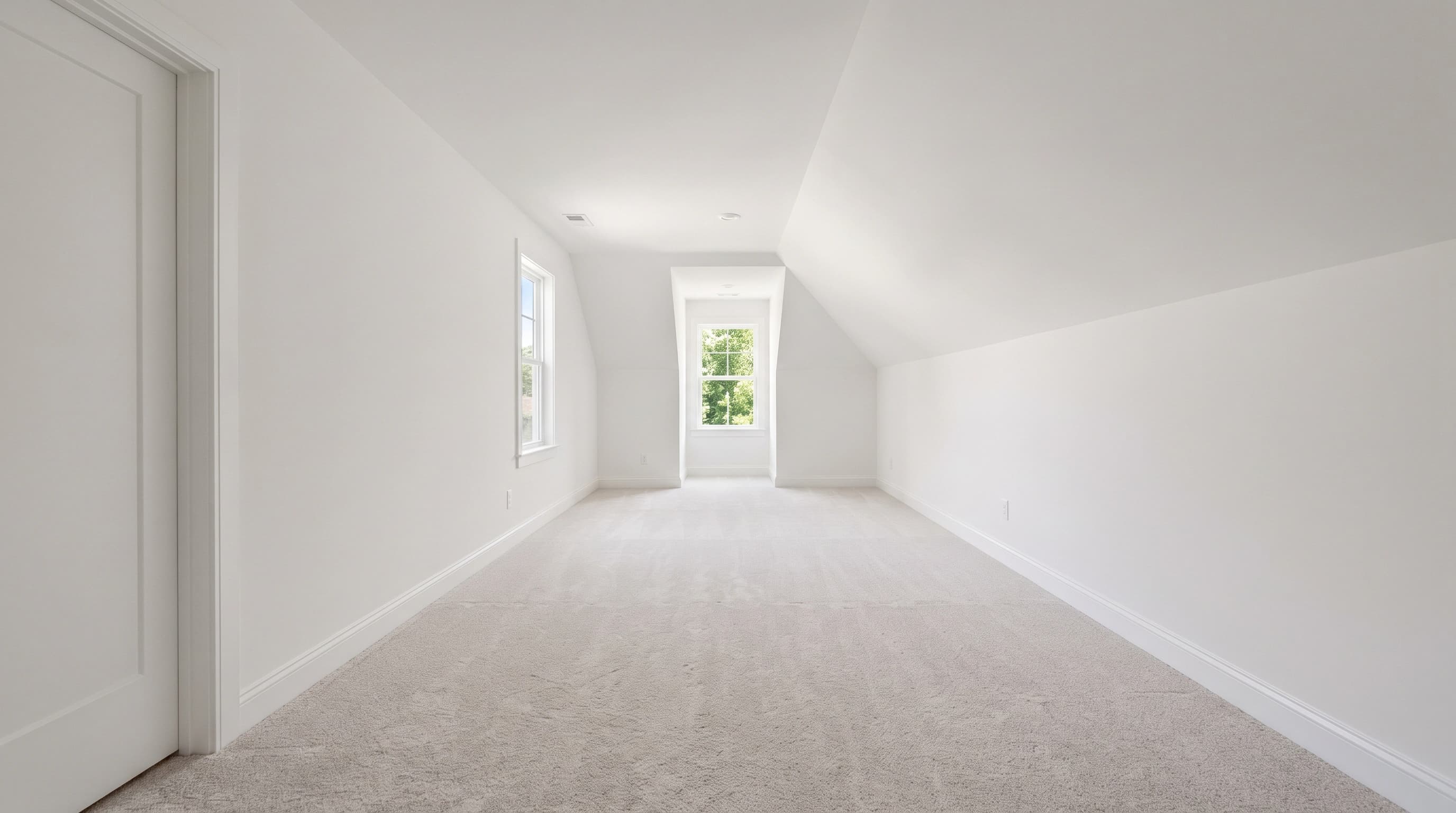
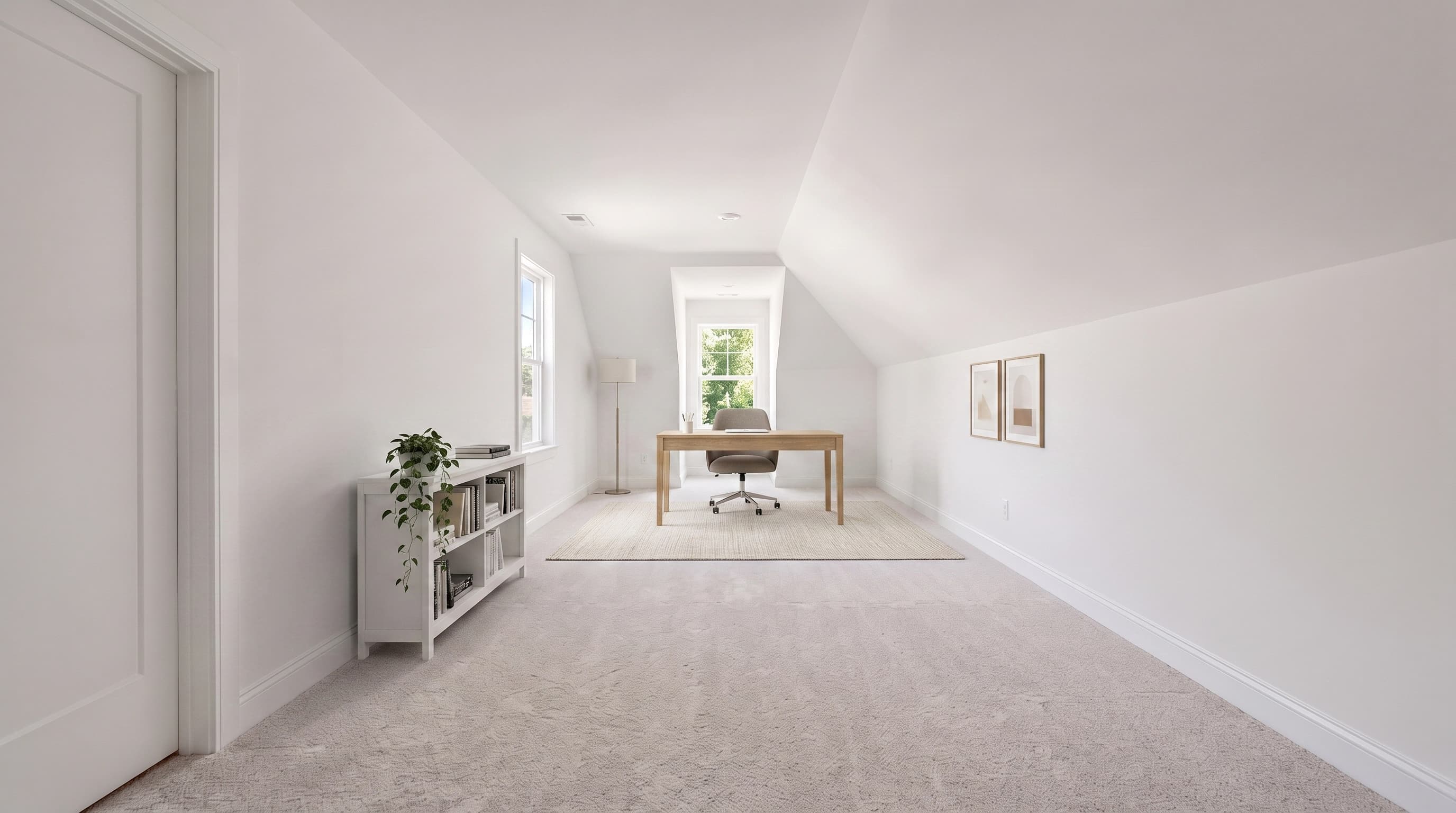
How to shoot the empty room so your virtual staging photos hold up
Staging software adds furniture to the photo you give it. It cannot fix the photo. Almost every bad staged image traces back to a source shot that gave the tool bad geometry to work with.
What to tell your photographer, or do yourself:
- Shoot level, from about chest height. Roughly 4 to 5 feet, camera level, verticals straight. A tilted camera puts converging walls in the frame, and furniture placed into a converging room looks like it is sliding downhill.
- Wide, but not fisheye. Somewhere around 16mm to 24mm on full frame. Ultra-wide distortion stretches the floor near the edges, and a sofa dropped into that stretched zone comes back the wrong scale.
- Get the whole floor plane in frame. Staging tools infer where the floor is and how far back it goes. If you crop the near floor out, the tool has no anchor and the rug floats.
- Two-point perspective, from a corner. Shooting into a corner shows two walls and gives the room depth to furnish. A flat one-wall shot gives the tool a shallow box.
- Even, bright, daylight-balanced light. Blown-out windows and deep shadow both destroy the floor and wall detail the tool needs. Bracket if you have to.
- Empty means empty. A leftover ladder, paint can, or floor fan will either survive into the staged image or get mangled by it. Sweep the room before the tripod goes down.
- Keep the original raw file. You will need the unaltered image later, and in California you are required to publish it. More on that below.


There is a compliance reason for the level, honest camera angle too, not just an aesthetic one. Bright MLS's Policy on Images and Documents in the MLS strictly prohibits "modifying photo(s)/rendering(s) to include visual elements not within a property owner's control," giving as its example "editing in a view of a scene that is not physically possible from the specified location in the real world." A staged photo built on a distorted or composited source shot can drift into exactly that.
How to virtually stage a home, step by step
Once you have clean empty-room photos, the staging pass is short:
- Pick one furniture style for the whole listing. Mixing mid-century in the living room with coastal in the bedroom reads as a stock-photo collage. Pick the style that matches the buyer your pricing targets and hold it across every room.
- Stage the room to its declared use. The dining room gets a dining set, not a second sitting area. Staging a room as something it is not is the fastest way to a misrepresentation complaint.
- Scale furniture to the actual room. A sectional in a 11-by-12 living room tells buyers the room is bigger than it is. Undersized furniture does the opposite and makes the room look cheap.
- Check the architecture pixel by pixel against the original. Windows, trim, outlets, floor registers, fireplace surround, flooring direction. If the tool moved a window mullion or changed the floor, throw the image out. This is the single check most agents skip and the one that creates real exposure.
- Label and pair. Caption it per your MLS rules and upload the unaltered original next to it.
Step 1 is the one agents underthink. Here is the same empty living room from above, staged three ways for three different buyers. The room is identical in all three; only the furniture answers the question of who is meant to live there.
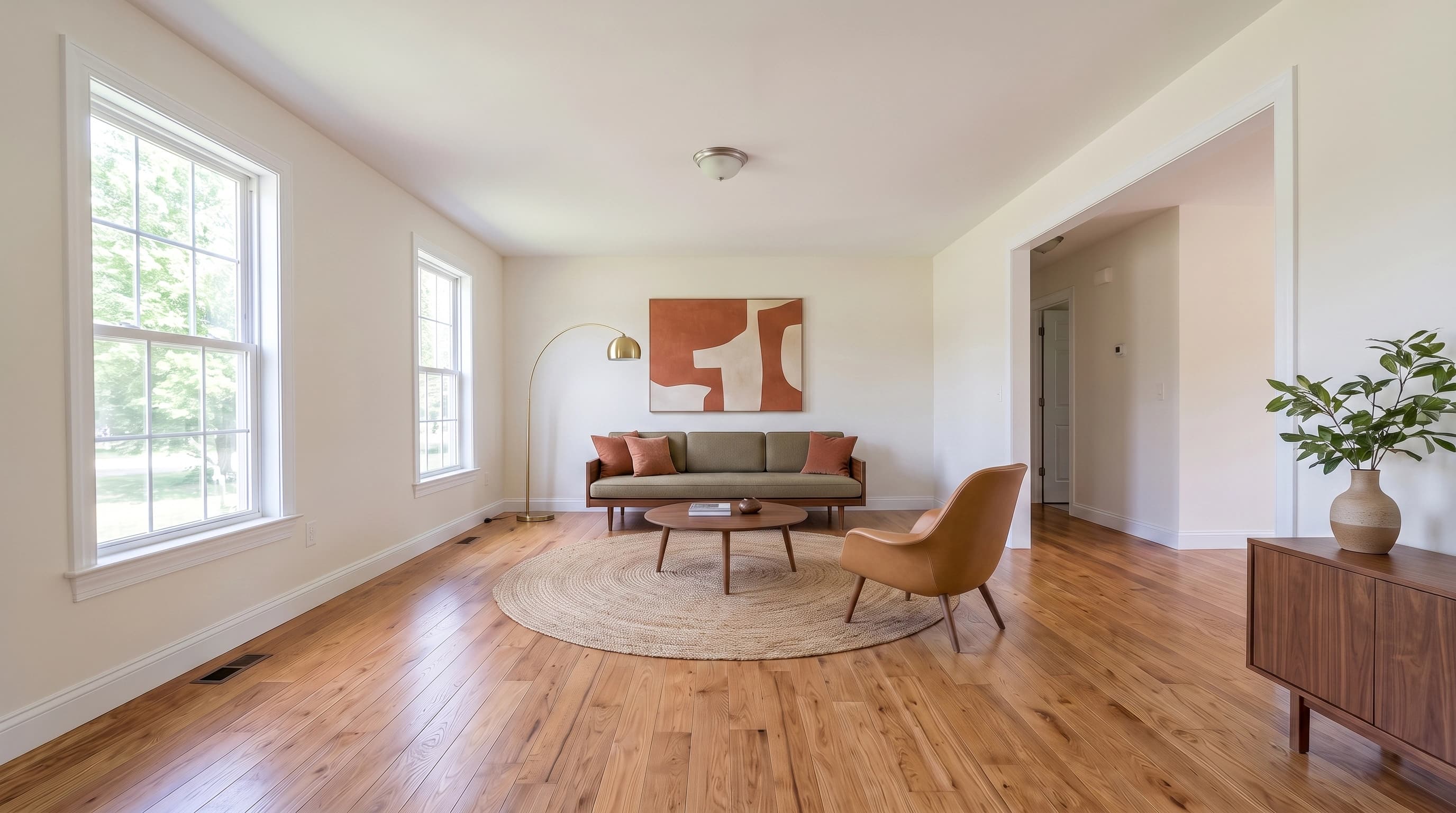

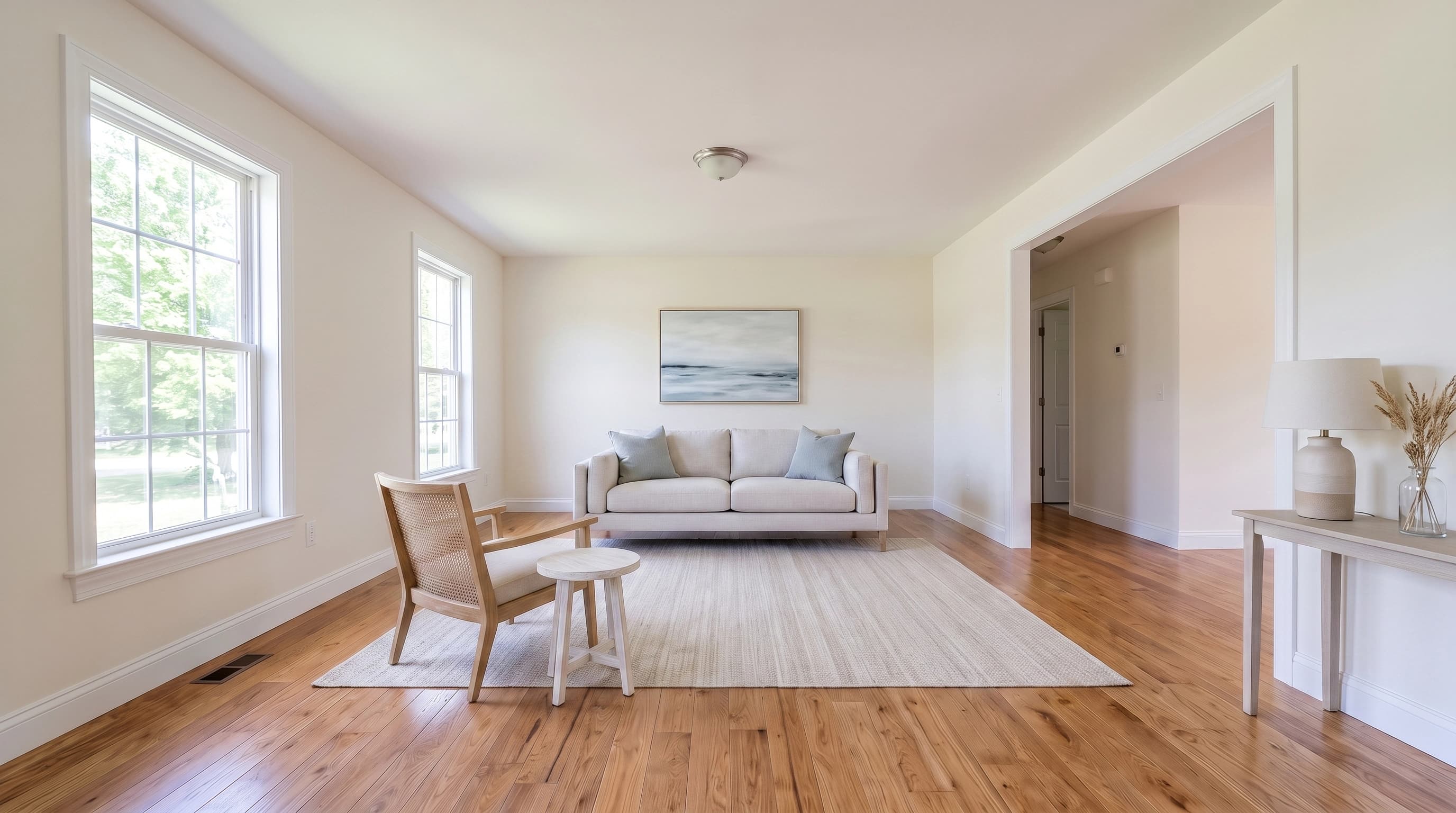
Dream Pixel Forge's virtual staging tool is built around step 4: the prompt holds the room's walls, windows, flooring, and camera angle fixed and adds only furnishings, at 2 credits per staged image. You still verify every output against the original, because no model is exempt from that check.
Try it now
Free to try, no account needed Example output
Your generated image will replace this example.
If the listing's problem is a dated kitchen rather than an empty one, staging is the wrong tool. A renovation preview shows what the space could become after work, which is a different claim with a different disclosure burden: it is a rendering of a hypothetical, and it must never be presented as the property's current condition.
How much does it cost for virtual staging?
Three price tiers, and they buy different things.
| Approach | Typical cost | Turnaround |
|---|---|---|
| Physical staging | $1,500 median for a staging service, per NAR 2025 | Days to schedule and install |
| Human-assisted virtual staging service | $30 per image at BoxBrownie | Under 48 hours, per its published turnaround |
| Self-serve AI staging | Cents to a few dollars per image | Seconds |
The NAR figure is a median across staging services for physical staging, and it does not include monthly furniture rental for as long as the listing sits. The $500 median applies when the sellers' agent personally staged the home instead.
At the bottom of the range, a June 2025 piece on NAR's site put AI staging "often as low as $0.17 per image." Worth knowing that article is labeled sponsored content from a staging vendor, so treat the number as a vendor's floor price rather than a market rate. The honest framing: the compute is nearly free and what you are really paying for is the retry budget. Restaging a living room three ways for three different buyer profiles is a rounding error on a self-serve tool and a real invoice at $30 an image.
For a full comparison of the paid options, see virtual staging software. If budget is the constraint, free virtual staging covers what the no-cost tiers actually let you publish.
Do you have to disclose virtual staging? What the rules actually say
There is no single national rule, and the confident blog claim that "most MLSs require a disclaimer" is not something you should act on without checking your own. Here is what is verifiable, in three separate layers.
Layer one, NAR ethics. If you are a REALTOR, Article 12 of the Code of Ethics states that "REALTORS shall be honest and truthful in their real estate communications and shall present a true picture in their advertising, marketing, and other representations." Standard of Practice 12-10 extends that to internet content specifically and prohibits "manipulating" listing content "in any way that produces a deceptive or misleading result," and separately "otherwise misleading consumers, including use of misleading images." Note what Article 12 does not do: it prescribes no caption wording, no watermark, and no format. It sets a standard, and unlabeled staging fails it. This layer binds NAR members, not every licensee.
Layer two, your MLS. This is where the operational rule lives, and it genuinely varies. Two real examples:
- Bright MLS (Mid-Atlantic), in its policy dated February 28, 2024, defines virtual staging as "using software to create a photo or conceptual rendering of what a room or property could look like, if it was staged or lived in," and states plainly that "virtually-staged photo(s)/rendering(s) must be disclosed in the MLS." It permits adding or replacing furniture, mirrors, artwork, and plants. It strictly prohibits editing out elements outside the owner's control, naming "power lines, water towers, or nearby highways." It does not, in that policy, specify caption wording or require a watermark.
- CRMLS (California) is more prescriptive. Its digitally altered image guidance for Rule 11.5.2 requires labeling with terms "such as 'digitally enhanced,' 'digitally altered,' or 'virtually staged'" and requires that "the original, unaltered version must appear in the listing immediately before or after the digitally enhanced image." Ordinary edits to "lighting, sharpening, white balance, color correction, angle, straightening, cropping, and exposure" are exempt. Virtually removing furniture that will not convey counts as altered too. Violations draw a warning first, then a $250 fine.
Those two are not the same rule. Bright requires disclosure and leaves the form open; CRMLS dictates the label vocabulary, the pairing with the original, and a penalty. Assume yours is its own thing and read it.
Layer three, state law. California passed AB 723 (Pellerin), "Real estate: digitally altered images: disclosure," chaptered as Chapter 497 and approved by the Governor on October 10, 2025. It adds Business and Professions Code section 10140.8, requiring a broker or salesperson who puts a digitally altered image in an advertisement to include a disclosure that is "reasonably conspicuous and located on or adjacent to the image," plus a link, URL, or QR code to the original unaltered image. It defines a digitally altered image as one changed "to add, remove, or change elements" including fixtures, furniture, landscape, views, and neighboring properties, and it exempts routine lighting, white balance, cropping, and exposure adjustments. CRMLS built Rule 11.5.2 to implement it, effective January 1, 2026.
That is one state. Most states have no equivalent statute today. The takeaway is not a universal rule you can memorize, it is a habit: check your MLS's current image policy and your state's advertising rules before your first staged listing, and ask your broker rather than a blog. Nothing here is legal advice.
The practice that satisfies all three layers regardless of jurisdiction: label the staged image on the image itself and in the caption, publish the unaltered original immediately next to it, and never alter anything structural or outside the seller's control.
Is virtual staging worth it? What the data actually supports
Here is where most articles on this topic quote a percentage they cannot source. The defensible version, from the NAR 2025 report:
- 83 percent of buyers' agents said staging a home made it easier for a buyer to visualize the property as a future home, and 31 percent said buyers were more willing to walk through a home they saw online. That is the real mechanism: staging buys showings.
- On price, the effect is modest and often absent. 41 percent of buyers' agents said staging had no impact on the dollar value offered; 17 percent reported a 1 to 5 percent increase; 24 percent were not sure. Sellers' agents: 30 percent no impact, 19 percent a 1 to 5 percent increase, 34 percent not sure.
- On speed, it leans positive: 30 percent of sellers' agents saw a slight decrease in time on market and 19 percent a large decrease, against 17 percent who saw no effect and 13 percent who saw an increase.
Important caveat, and it is the one nobody prints: those numbers describe staging in general, overwhelmingly physical staging. The same report's question about virtual staging specifically is much less flattering. Asked how important virtual staging was to their clients, only 18 percent of buyers' agents rated it more or much more important, while 51 percent rated it less or much less important. It ranked dead last behind photos, physical staging, videos, and virtual tours. Sellers' agents said much the same: 16 percent more important, 60 percent less.
Read honestly, that is not an argument against virtual staging. It is an argument about what it is for. Photos were rated most important by 73 percent of buyers' agents and 88 percent of sellers' agents. Virtual staging is a way to make one specific set of photos, the ones of your empty rooms, stop repelling clicks. It is a cheap fix for a specific defect, not a value-add you can price into the listing. Eight percent of sellers' agents in the survey reported using virtual staging exclusively, so it is a real practice, just a targeted one.
Where it clearly earns its keep: vacant listings, new construction, listings priced where a $1,500 physical staging bill does not pencil, and rooms whose function is not obvious. Where it does not: an occupied home that photographs well already.
What do realtors use for virtual staging?
Three categories, and most agents end up using two of them.
Full-service virtual staging vendors. A human designer stages your photo and sends it back, typically inside two days at roughly $30 per image. You are buying judgment and a finished result, and you accept the turnaround and the per-image cost. Good for luxury listings where the staging has to be beyond reproach.
Self-serve AI staging tools. You upload, pick a room type and style, and get an image in seconds for a fraction of that. Good for volume, for restaging the same room several ways, and for the Tuesday-afternoon problem of a listing going live Wednesday. The tradeoff is that you are the quality control.
Platform features. These are worth understanding because they are not the same product. Zillow launched AI-powered Virtual Staging for Showcase listings on September 10, 2025, but it works as a buyer-side preview: the shopper taps a button and sees a room in a chosen style, with your original photo still there. It does not replace your listing photos and it does not satisfy your MLS's disclosure obligation for photos you upload.
The general-purpose chatbots are a fourth option people try, and mostly should not, because they redraw the room instead of furnishing your photo. Whether ChatGPT can do virtual staging covers why that distinction matters for a listing photo.
Can you do virtual staging yourself?
Yes, and for a vacant listing it is a 20 minute job. The skill is not operating the software, it is the four judgment calls around it: choosing the rooms, getting a clean level shot of each, verifying the output against the original, and labeling correctly for your MLS. None of those require a designer. All of them require you to actually do them.
The one thing worth outsourcing is the photography. A photographer who shoots level, wide, and evenly lit produces source images that stage cleanly on the first pass, and 76 percent of sellers' agents in the NAR survey already recommend professional photos to their sellers. Paying for good empty-room photos and staging them yourself is the best cost-to-quality point in this whole workflow.
The bottom line
Stage four to six rooms, not the whole house. Shoot level and wide, with the floor in frame. Hold one furniture style across the listing. Check every staged image against the original for changed architecture before it goes anywhere. Label it the way your MLS says to and publish the unaltered original beside it. Do that and virtual staging does the one job the evidence actually supports: it gets your vacant listing enough clicks to earn a showing.
Ready to run it on a real photo? The virtual staging tool takes an empty room shot and returns a furnished version with the architecture held fixed, and new accounts start with free credits so you can judge it on your own listing before spending anything. Credit pricing is on the pricing page.