Guides
Character Reference Sheet: What to Include and How to Make One
Learn what a character reference sheet should include, how to build one traditionally, and how AI changes the workflow without changing its purpose.
A character reference sheet is a single organized image (or a small set) that pins down exactly what a character looks like: their face from a few angles, their body proportions, their outfit, their color palette, and the small details that make them recognizable. Artists, animators, and game studios build one before they draw a character in any real scene, because it is the thing everyone checks the finished work against. This guide covers what a reference sheet is, what to put on it, how to make one the traditional way, and how the AI workflow changes the job, so you can produce a sheet you can actually reuse.
What is a character reference sheet?
A character reference sheet is the canonical record of a character's design. Instead of describing the character in words and hoping everyone imagines the same person, you commit the design to a picture that shows the character clearly enough to be reproduced. Once the sheet exists, it becomes the reference: an animator drawing frame 400, a modeler building the 3D mesh, or an AI tool generating the next scene all work from the same fixed source instead of reinventing the character each time.
The term overlaps with a few others you will see used interchangeably. A character design sheet is the same idea, emphasizing the design-development stage. A model sheet or character turnaround leans on the multi-angle views specifically, a convention that goes back to traditional animation studios in the early 20th century, where artists needed the whole team to keep a character on-model across thousands of hand-drawn frames. The distinctions are soft; the shared job is the same, which is why the character turnaround is best understood as one component of a fuller reference sheet rather than a separate thing.
What should a character reference sheet include?
A reference sheet only earns its place if someone else (or a tool, or you three months later) can rebuild the character from it with no guessing. That means covering the parts a single portrait leaves ambiguous. A thorough sheet includes:
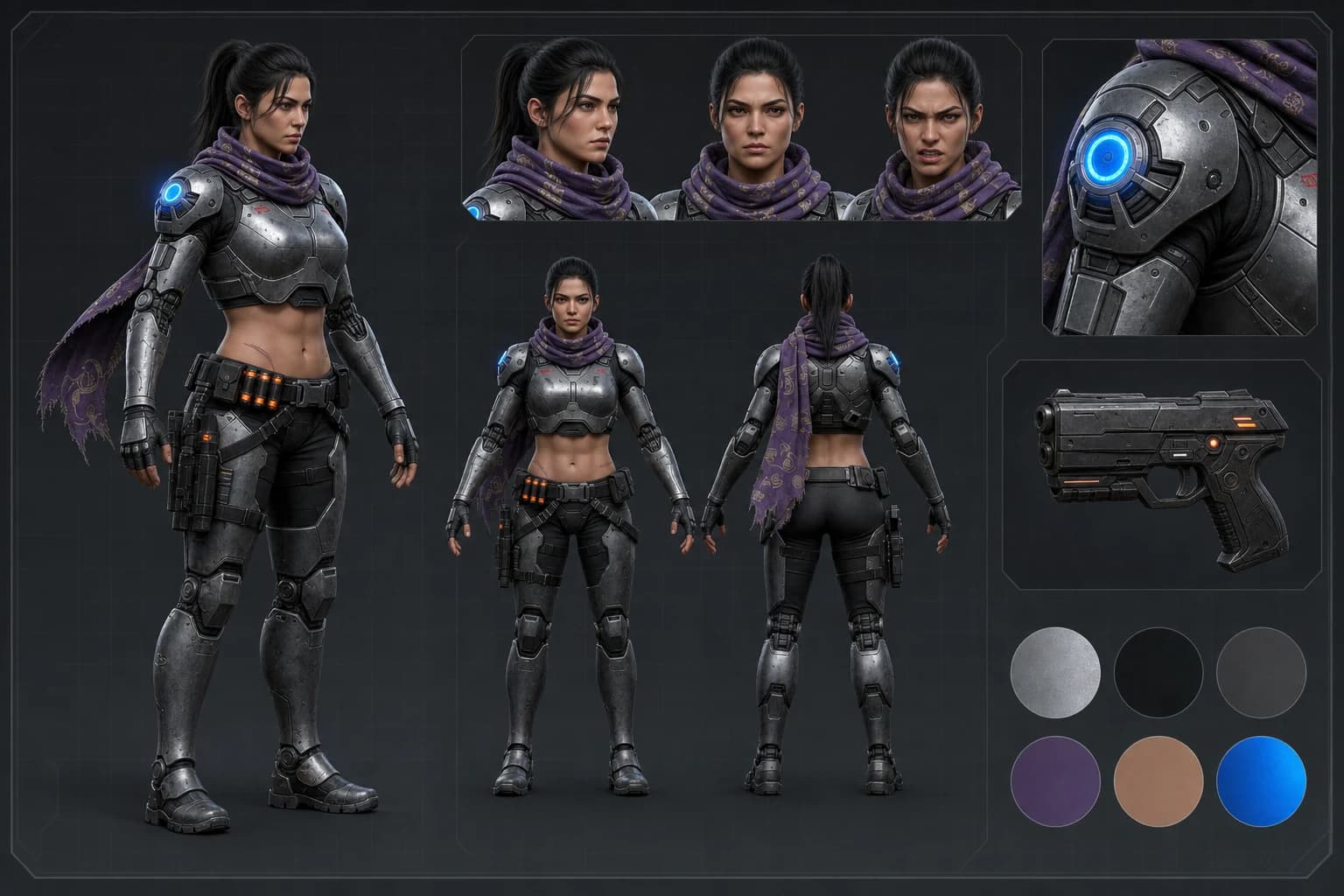
- Multiple angles. At minimum a front and side view; a full turnaround adds back and three-quarter views. This is what lets anyone draw or model the character in any orientation. Back and three-quarter views are where hairstyles, clothing seams, and silhouette get resolved, and they are exactly what a single front-facing image cannot show.
- A clear face and head study. A clean shot of the face at a readable size, since the face carries most of the recognition. Some sheets add a separate head-angle strip because facial proportions drift fastest.
- Expressions. A few key emotions (neutral, happy, angry, surprised) so the character reads as the same person across moods, not just in a blank stare.
- A color palette. The exact colors of skin, hair, eyes, and outfit, ideally as named swatches or hex codes, so the palette does not drift between images.
- Proportion and scale notes. Height relative to a reference (a height chart or a simple human silhouette), and body-type notes, so the character is not accidentally redrawn taller or heavier.
- Outfit and prop details. Close-ups of anything that defines the character: a signature jacket, a weapon, an accessory, a scar or tattoo. Details that appear small in a full-body shot get their own callout.
- Identity notes in text. A short written list of defining traits (age, distinguishing marks, personality in a line). This anchors the design and doubles as the prompt block if you generate more images later.
You do not need every element for every project. A one-off illustration might need only a front view plus a palette. A character you will draw a hundred times, or generate dozens of AI images of, wants the full set, because every ambiguity you leave becomes a place the design can drift.
How to make a character reference sheet
The traditional, draw-it-yourself workflow is a sequence, and the order matters because each step locks decisions the next one depends on.
- Gather inspiration and decide the concept. Before drawing anything final, collect mood-board references and settle the character's core: who they are, their role, their vibe. Sketch loose thumbnails to explore silhouettes and pick a direction.
- Lock the front view. Draw a clean front-facing full-body version and get the proportions and outfit exactly right. This is the master the rest of the sheet inherits from, so do not rush it.
- Build the turnaround. Using horizontal guidelines that keep features (eye line, shoulders, waist, knees) at the same height across views, draw the side, back, and three-quarter angles so they clearly depict the same body from different directions.
- Add expressions and detail callouts. Draw a strip of key facial expressions and close-ups of any signature props or design details that get lost at full-body scale.
- Set the palette and label it. Fill in final colors and place named swatches or hex codes on the sheet so the palette is unambiguous. Add any text notes on height, age, and distinguishing marks.
- Lay it out and review. Arrange everything on one page so it reads as a single document, then review the whole thing together. On-model problems are easiest to catch when the views sit side by side.
This produces a genuinely reusable sheet. It also takes real drawing skill and hours per character, which is where the AI workflow comes in for people who need the same reference document without the illustration time.
Building a character reference sheet with AI
The AI version keeps the same goal (a fixed, reusable record of the design) but changes how you produce the panels. Instead of drawing each view, you generate them from a description or from photo references, then assemble the sheet. Concept art tools are well suited to the early stage here: you are exploring a look and producing clean, isolated character art rather than finished scenes. Our AI concept art generator is built for exactly this front of the pipeline, turning a description into character concept art you can treat as the master view of your sheet.
The catch is the one that makes reference sheets hard in AI specifically: a general text-to-image model is stateless, so asking it for a front view and then a side view often gives you two subtly different people. The angles have to depict the same character, and that is the part naive prompting does not deliver. Getting there reliably needs a way to hold the identity fixed across every panel, which is the same problem covered in depth in our guide to consistent AI characters.
Tools handle this at different levels. Some give you a manual anchor: Midjourney's Omni Reference (the --oref parameter, weighted with --ow from 1 to 1000, default 100, a V7-only feature) lets you feed one reference image into each new generation. That gets the panels closer, but you are re-supplying and tuning the reference every time. A purpose-built character tool goes further by storing the identity once and conditioning every render on it automatically, so the front, side, and expression panels are the same person by construction rather than by luck.
Keeping the sheet on-model with a locked identity
Dream Pixel Forge is built around that locked-identity approach, which is what turns a set of AI panels into a real reference sheet instead of a gallery of lookalikes.
- Define the character once. Give a name and an appearance description, start from a preset and edit it, or import up to five reference photos to seed a specific look.
- Approve a character sheet. The app generates a character sheet as the identity anchor, you review it and regenerate with feedback until it is right, then approve. Approval locks the identity.
- Generate the rest against it. Every image after that renders the same locked character, so additional angles, expressions, and outfits stay on-model automatically, no re-uploading references or seed juggling.
Creating a character also asks you to declare a likeness basis (your own likeness, an authorized person's, or fully synthetic), which keeps the one genuinely risky choice explicit. Once the identity is locked, expanding the sheet into new poses and scenes is the easy part rather than the point where the character falls apart.
Try it now
Free to try, no account needed Example output
Your generated image will replace this example.
Where can I find free character sheets?
If you want a starting point rather than a blank page, a few honest options exist. Blank templates: design tools like Canva and community boards on Pinterest host free reference-sheet layouts you can fill in, which is useful mainly for structure. Character hosting communities: sites where artists post their original characters give you thousands of real examples to study for what a good sheet looks like, though what you find there are other people's characters, not templates to reuse. Tabletop character sheets are a different thing worth flagging, since the same search turns them up: for role-playing games, official free character record sheets (the stats-and-inventory kind) are published as free PDFs by the game makers, and those are unrelated to art reference sheets.
The catch with free art templates is that they solve the layout, not the drawing. You still have to produce the character art that goes in the panels, and it still has to be the same character across every view. Generating the panels from a locked identity sidesteps both problems at once, which is why the AI route is often faster than filling a free template by hand.
Turn one sheet into a whole character
A reference sheet is the foundation, not the finish line. Once you have a design you can reproduce, the payoff is range: the same character in new poses, outfits, and scenes without turning into someone else. Nail the sheet first, get it exactly right, then generate against it. Start your character with the AI character generator, and see the pricing page for how credits work. The sheet takes a few minutes. Getting it right is what makes every image after it hold together.